

Last verified: August 26, 2026. Latest stable GitHub release checked: v1.0.22.
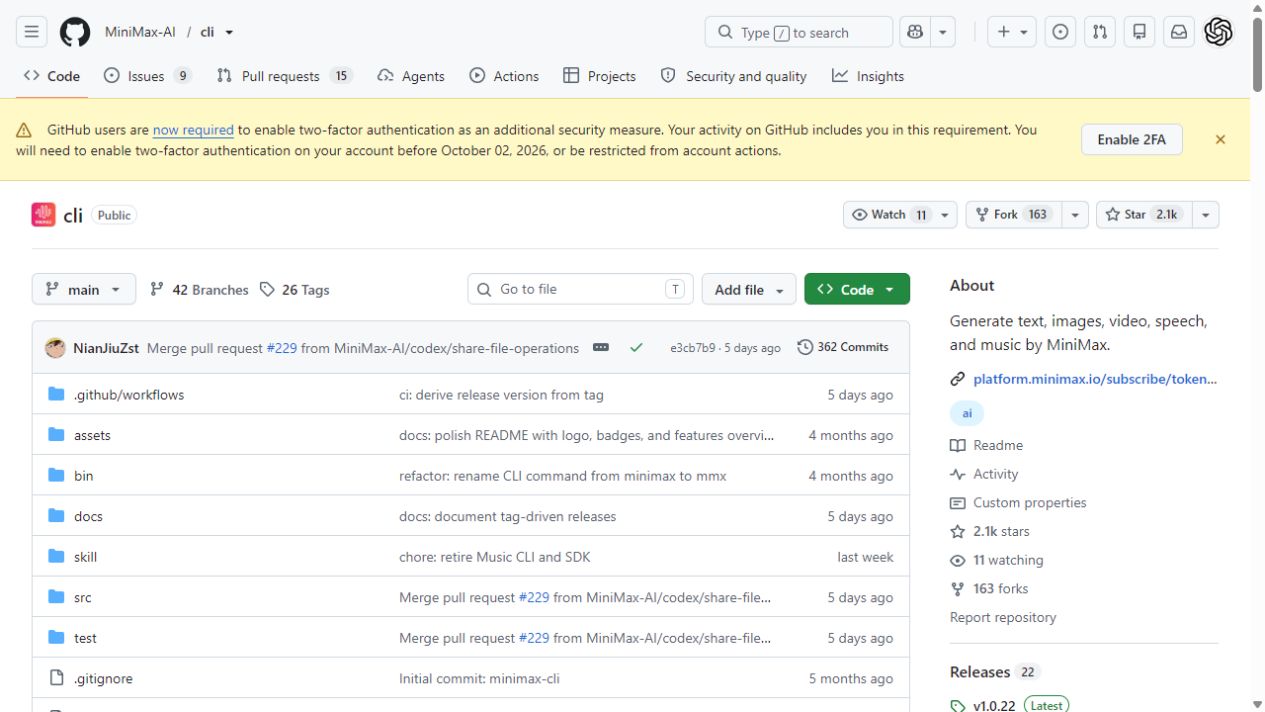
MiniMax CLI is MiniMax’s official command-line interface for text generation, image generation, video generation, text-to-speech, vision understanding, and web search. It installs as the mmx-cli npm package and exposes the mmx terminal command.
The official repository presents the CLI as a tool for terminal users and AI agents. It can help with quick experiments, local automation, media-generation workflows, and agent tasks without requiring you to write a separate API client for every supported capability.
Historical availability warning: release v1.0.21, published on August 21, 2026, retired Music CLI and SDK support. The current README no longer documents
mmx music. Some older hosted documentation and repository metadata still contain the previous wording; do not use those retired commands as current instructions.
Use this guide to install the current CLI, authenticate, choose the correct region and credential, run supported commands, use MiniMax-H3 through the current V2 workflow, and decide when the CLI is appropriate instead of a direct API integration.
Quick answer: what is MiniMax CLI?
MiniMax CLI is a Node.js-based package named mmx-cli. Installing it globally creates a command named mmx. The current official package metadata and README require Node.js 18 or newer.
| Term | Meaning |
|---|---|
| MiniMax CLI | The official command-line interface for supported MiniMax AI Platform capabilities. |
mmx-cli | The npm package installed globally. |
mmx | The terminal command created by the package. |
| Token Plan Key / Subscription Key | The credential used for eligible Token Plan and Credits resources. |
| Pay-as-you-go API Key | A separate Open Platform credential. The current H3 CLI examples pass this key per command. |
What MiniMax CLI can generate and analyze
The current official repository README lists text, image, video, speech, vision, search, and dual-region support for Global and Mainland China endpoints.
| Capability | Command family | Typical use |
|---|---|---|
| Text | mmx text | Multi-turn chat, streaming, system prompts, and JSON output. |
| Image | mmx image | Text-to-image with aspect-ratio and batch controls. |
| Video | mmx video | Hailuo V1 and MiniMax-H3 V2 generation, task tracking, and download. |
| Speech | mmx speech | Text-to-speech, voice selection, speed control, and streaming playback. |
| Vision | mmx vision | Image understanding from local files, URLs, or file IDs. |
| Search | mmx search | MiniMax-powered web search. |
| Account and configuration | mmx auth, mmx quota, mmx config, mmx update | Authentication, quota, region, settings, and updates. |
Who should use MiniMax CLI?
MiniMax CLI is a good fit for developers, technical creators, AI-agent users, and automation builders who prefer terminal workflows. It is useful for testing supported capabilities, generating local output files, and letting a coding agent invoke a documented command during a larger workflow.
- Use it for fast terminal experiments and prototypes.
- Use it when an AI agent needs a supported command-line tool.
- Use it when local output paths are more convenient than writing a custom client.
- Prefer the direct API for production backends, high-concurrency workloads, strict schemas, queues, retries, monitoring, and custom billing controls.
Prerequisites
| Requirement | Why it matters |
|---|---|
| Node.js 18+ | The current repository README and package metadata require Node.js 18 or newer. |
| npm | The documented global installation uses npm. |
| A suitable MiniMax credential | The normal Token Plan path uses a Token Plan Key; H3 currently uses a pay-as-you-go API key in the CLI examples. |
| Correct service region | Global and Mainland China use different API hosts and account regions. |
| A safe place for generated files | Explicit output paths make automation easier and prevent misplaced assets. |
A Token Plan Key and a standard pay-as-you-go API Key are separate credentials. Do not assume that a plan entitlement covers MiniMax-H3; the current Token Plan pricing table excludes H3.
Install MiniMax CLI
Install the CLI globally:
npm install -g mmx-cliVerify the installed command and version:
mmx --versionFor supported AI-agent workflows, the official README also provides an optional Skill installation command:
npx skills add MiniMax-AI/cli -y -gAuthenticate MiniMax CLI
Start interactive authentication:
mmx auth loginOr save a key non-interactively:
mmx auth login --api-key sk-xxxxxReplace sk-xxxxx with the credential for the intended account, region, and billing path. Never paste a real key into public repositories, screenshots, logs, analytics tools, or support messages.
Check the active authentication state:
mmx auth statusThe official README calls mmx auth status the canonical way to verify active authentication. It also documents this credential priority: per-command --api-key, then OAuth saved in the config, then an API key saved in the config.
mmx quota
mmx config show
Global and Mainland China regions
The CLI supports Global and Mainland China endpoints. API-key authentication can probe both regions, but a saved region must still match the service used by the credential.
# Global service
mmx config set --key region --value global

# Mainland China service
mmx config set --key region --value cn

# Verify the active authentication after changing region
mmx auth status
The current README also documents --region as a global CLI option. It is not an H3 generation parameter, and normal video generation uses the saved or automatically detected region.
Run a first test
Start with a small text request because it is quick to inspect:
mmx text chat --message "Write a four-line poem about AI"
mmx quota
MiniMax CLI command cheat sheet
| Goal | Command |
|---|---|
| Log in interactively | mmx auth login |
| Log in with a key | mmx auth login --api-key sk-xxxxx |
| Check authentication | mmx auth status |
| Refresh OAuth authentication | mmx auth refresh |
| Log out | mmx auth logout |
| Show quota | mmx quota |
| Show configuration | mmx config show |
| Update the CLI | mmx update latest |
| Generate text | mmx text chat --message "Write a poem" |
| Generate an image | mmx image "A cat in a spacesuit" |
| Generate Hailuo video | mmx video generate --prompt "Ocean waves at sunset" --download sunset.mp4 |
| Generate H3 video | mmx video generate --api-key "$MINIMAX_API_KEY" --model MiniMax-H3 --prompt "Ocean waves at sunset" |
| Generate speech | mmx speech synthesize --text "Hello!" --out hello.mp3 |
| Analyze an image | mmx vision photo.jpg |
| Search the web | mmx search "MiniMax AI" |
Generate text
mmx text chat --message "Explain MiniMax CLI in one paragraph."

mmx text chat \
  --system "You are a concise technical documentation writer." \
  --message "Explain how to install MiniMax CLI."

mmx text chat \
  --model MiniMax-M3 \
  --message "Give me a checklist for testing an AI CLI." \
  --stream
The current README documents basic chat, model selection, streaming, system prompts, multi-turn messages, and JSON output. Confirm that the chosen model is available to the credential and region you are using.
Generate images
mmx image "A cat in a spacesuit"

mmx image generate \
  --prompt "A cinematic product photo of a matte black smart speaker" \
  --n 3 \
  --aspect-ratio 16:9

mmx image generate \
  --prompt "Minimalist logo for an AI automation studio" \
  --out-dir ./out/
Generate video with Hailuo V1
The current README labels these examples as Hailuo-2.3 through Video Generation V1:
mmx video generate \
  --prompt "Ocean waves at sunset" \
  --download sunset.mp4

mmx video generate \
  --prompt "A robot painting" \
  --async

mmx video task get --task-id 123456
Generate video with MiniMax-H3 V2
The current CLI README documents MiniMax-H3 separately from the Hailuo V1 flow. Its examples pass a pay-as-you-go API key through --api-key. The current Token Plan pricing table excludes H3.
# Text-to-video
mmx video generate \
  --api-key "$MINIMAX_API_KEY" \
  --model MiniMax-H3 \
  --prompt "Ocean waves at sunset"

# Start-image guidance
mmx video generate \
  --api-key "$MINIMAX_API_KEY" \
  --model MiniMax-H3 \
  --prompt "The subject walks forward" \
  --image start.jpg

# Multimodal references
mmx video generate \
  --api-key "$MINIMAX_API_KEY" \
  --model MiniMax-H3 \
  --prompt "Keep the same character" \
  --reference-image character.png \
  --reference-video motion.mp4
For H3 text-to-video, the current README states defaults of 2K resolution, 5 seconds, and a 16:9 aspect ratio. Set explicit parameters when the workflow requires a different supported output.
H3 local-file and request-body limits
| Input | Current CLI preflight limit |
|---|---|
| Image | 30 MB |
| Reference video | 50 MB |
| Reference audio | 15 MB |
| Total JSON request body | 64 MB |
The README says these checks apply to local files and Base64 data URIs. The API separately validates media dimensions, aspect ratio, duration, frame rate, and codecs. Passing the CLI size check does not guarantee that a media file satisfies every API constraint.
mmx video task get --task-id 424010985738629 --model MiniMax-H3
mmx video download --file-id 176844028768320 --out video.mp4
Generate speech
mmx speech synthesize \
  --text "Hello from MiniMax CLI." \
  --out hello.mp3

mmx speech synthesize \
  --text "This is a short product update." \
  --voice English_magnetic_voiced_man \
  --speed 1.2 \
  --out update.mp3

echo "Breaking news" | mmx speech synthesize --text-file - --out news.mp3

mmx speech voices
Review pronunciation, language, pacing, consent, and rights before publishing synthetic speech. A voice name shown in an example does not guarantee availability in every account or region.
Analyze images with vision
mmx vision photo.jpg

mmx vision describe \
  --image https://example.com/img.jpg \
  --prompt "What objects are visible in this image?"

mmx vision describe --file-id file-123
Search the web
mmx search "MiniMax AI latest news"

mmx search query \
  --q "latest MiniMax CLI updates" \
  --output json
The current README states that the /v1/coding_plan/search endpoint returns at most 10 results per call and does not expose a pagination parameter. Refine the query when you need a different result set, and verify important findings against the original source.
Where generated files are saved
MiniMax’s hosted CLI documentation says generated files are saved under minimax-output/ in the current directory unless an output option is supplied. Use explicit paths for repeatable project workflows.
mmx speech synthesize \
  --text "Welcome to the demo." \
  --out ./assets/audio/welcome.mp3

mmx image generate \
  --prompt "Clean SaaS dashboard hero image" \
  --out-dir ./assets/images/

mmx video generate \
  --prompt "A short product-demo scene" \
  --download ./assets/video/demo.mp4
Use MiniMax CLI with AI agents
The repository provides a Skill-installation route for agents such as Claude Code, OpenClaw, and Cursor. A basic setup is:
npm install -g mmx-cli
mmx --version
mmx auth login --api-key sk-xxxxx
npx skills add MiniMax-AI/cli -y -g
mmx auth status
mmx quota
Then give the agent a narrow instruction with the intended output path, for example: Use MiniMax CLI to create a 16:9 product image and save it in ./assets/images/. Review commands before execution and never give an agent broader filesystem or credential access than the task requires.
MiniMax CLI versus API, MCP, and web interfaces
| Option | Best for | Main tradeoff |
|---|---|---|
| MiniMax CLI | Terminal workflows, AI agents, fast testing, and local automation | Less control than a custom production integration |
| MiniMax API | Production apps, backend services, structured requests, monitoring, and custom billing controls | Requires engineering, retries, validation, and infrastructure |
| MiniMax MCP | MCP-compatible clients that require structured tool access | Capabilities and models depend on the current server implementation |
| Official web product | Manual, visual, or non-technical workflows | Harder to automate and integrate into backend systems |
Practical workflows
Article asset pipeline
mmx text chat --message "Create five visual concepts for an article about AI video tools."
mmx image generate --prompt "Editorial hero image for AI video tools" --aspect-ratio 16:9 --out-dir ./assets/
mmx speech synthesize --text "Here is a quick overview of the article." --out ./assets/intro.mp3
Product demo media
mmx image generate \
  --prompt "A clean product hero image for a developer automation platform" \
  --aspect-ratio 16:9 \
  --out-dir ./demo-assets/

mmx video generate \
  --prompt "A cinematic product-demo scene showing automation dashboards" \
  --download ./demo-assets/demo.mp4

mmx speech synthesize \
  --text "Automate multimodal AI tasks directly from your terminal." \
  --out ./demo-assets/voiceover.mp3
Common errors and fixes
| Problem | Likely cause | Fix |
|---|---|---|
mmx: command not found | The package is not installed globally, or npm’s global binary directory is not on PATH. | Run npm install -g mmx-cli, restart the terminal, and run mmx --version. |
| 401 after login | Credential or region mismatch. | Set global or cn correctly, then run mmx auth status. |
| H3 request uses Token Plan quota | The wrong credential or billing assumption is being used. | Use the current per-command H3 pattern with a pay-as-you-go API key and verify the final billing route. |
| H3 media is rejected | The file may exceed CLI preflight limits or fail an API media constraint. | Check file size, dimensions, aspect ratio, duration, frame rate, codec, and total JSON size. |
| Quota-related failure | Plan quota or an eligible resource is unavailable. | Run mmx quota and inspect the official account console. |
| Search results are limited | The search endpoint returns at most 10 results and has no pagination parameter. | Refine the search query. |
| Generated files are hard to find | No explicit output path was set. | Check minimax-output/ or use the supported output option. |
Agent does not know mmx | The optional Skill is missing or the agent has not reloaded it. | Install the official Skill, then restart or refresh the agent. |
Security notes for keys
- Use placeholders such as
sk-xxxxxin examples. - Store credentials in a protected secret manager or environment.
- Do not commit credentials to version control.
- Do not share screenshots that expose keys, tokens, account identifiers, or billing information.
- Rotate a key immediately if it is exposed.
- Use
mmx auth statusto confirm authentication instead of printing a secret.
Limitations
- CLI capabilities and commands can change between releases. Pin and test the version used by an automated workflow.
- A documented command does not guarantee account entitlement to the underlying resource.
- Token Plan, Credits, and pay-as-you-go use different billing logic and credentials.
- Search is not a complete research platform and its current result count is limited.
- Generated text and media require factual, quality, rights, and safety review before publication.
- For production applications, a direct API integration generally provides better control over retries, validation, monitoring, and cost accounting.
Best first commands
mmx --version
mmx auth status
mmx quota
mmx text chat --message "Summarize what MiniMax CLI can do in five bullet points."
mmx image "A clean 16:9 hero image for a developer CLI tool"
mmx speech synthesize --text "MiniMax CLI is ready." --out ready.mp3
mmx vision photo.jpg
mmx search "MiniMax CLI official documentation"
Frequently asked questions
Is MiniMax CLI official?
Yes. The MiniMax-AI GitHub repository describes it as the official CLI for the MiniMax AI Platform.
What is the difference between mmx-cli and mmx?
mmx-cli is the npm package name. mmx is the command-line binary installed by that package.
Which Node.js version is required?
The current official README and package metadata require Node.js 18 or newer.
How do I install and log in?
npm install -g mmx-cli
mmx auth login
mmx auth status
For non-interactive authentication, the README also documents mmx auth login --api-key sk-xxxxx. Use the key intended for the correct account, region, and billing route.
Can MiniMax CLI generate MiniMax-H3 video?
Yes. The current README documents MiniMax-H3 through Video Generation V2 and passes a pay-as-you-go API key per command. The default text-to-video settings documented there are 2K, 5 seconds, and 16:9. Check the current H3 API and CLI documentation before production use.
Why am I getting a 401 error?
A 401 commonly indicates a wrong credential, service region, or API host. Set global or cn to match the credential, then run mmx auth status. Do not expose the key while debugging.
Where are generated files saved?
The hosted CLI documentation says the default directory is minimax-output/ under the current working directory. Use explicit output options for predictable automation.
When should I use the API instead?
Use a direct API integration for production applications, custom backend logic, structured requests, validation, monitoring, retries, queues, high concurrency, and detailed cost controls.
Official sources
- MiniMax-AI/cli official repository and current README
- MiniMax CLI v1.0.22 release
- MiniMax CLI v1.0.21 release notes
- Official package metadata
- MiniMax hosted CLI documentation — use with the dated release caveat above
- Official Token Plan coverage and exclusions
- MiniMax API overview and credential distinction