

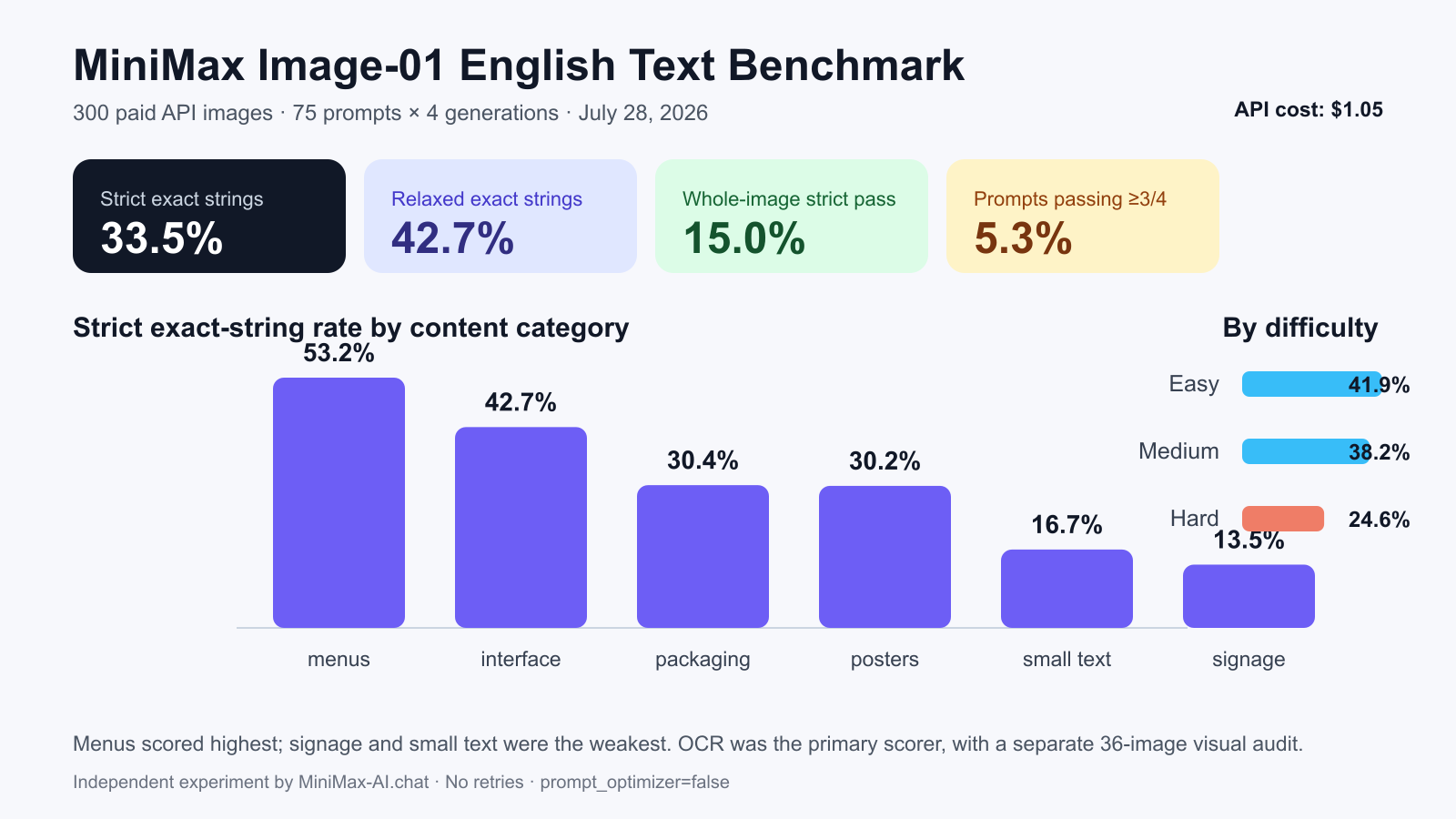
Quick answer: MiniMax Image-01 produced the exact requested English string only 33.51% of the time in our 300-image test. The model was much better at menus (53.23%) than signage (13.46%) or small technical text (16.67%). Only 15% of images reproduced every required string exactly, and just 4 of 75 prompts succeeded in at least three of four attempts. The images were often visually attractive, but exact spelling, punctuation, numbers and extra invented text remained unreliable. Use Image-01 to explore a layout; do not send text-heavy output to production without checking and correcting it.
Independent test notice: MiniMax-AI.chat is not owned by or affiliated with MiniMax. We paid for and ran this benchmark through the public MiniMax API on July 28, 2026. No result was selected or removed for visual quality.
Image-01 English text benchmark results
| Metric | Result | What it means |
|---|---|---|
| Images generated | 300 | 75 prompts with four outputs each |
| Expected strings | 576 | Every required phrase scored separately |
| Strict exact-string rate | 33.5069% | Case and punctuation preserved after whitespace normalization |
| Relaxed exact-string rate | 42.7083% | Case- and punctuation-insensitive diagnostic score |
| Mean character accuracy | 72.8905% | Near misses receive partial credit |
| Whole-image strict pass rate | 15.0% | Every expected string in the image was exact |
| Prompt success rate | 5.333% | At least three of four outputs were whole-image passes |
| API generation cost | $1.05 | 300 images at the listed $0.0035 per image |
The central distinction is between looking plausible and being exact. A generated sign may look professional at a glance while changing one letter. A product label may contain the correct brand but invent fine print. That difference matters for advertisements, packaging, user interfaces, prices, filenames and safety instructions.
How we tested MiniMax Image-01
We created 75 original English prompts across six practical categories: 13 signs, 13 product packages, 13 menus, 12 posters, 12 interface screens and 12 small-text scenes. Each prompt defined one to three exact strings plus a visual setting and a “no other readable text” constraint. The set progressed from short phrases such as “EXIT 24B” to punctuation-heavy strings such as “FILE: Q4_summary-v7.pdf” and “TOLERANCE: ±0.005 mm.”
- Signage: storefront, road, transit, airport and safety signs.
- Packaging: boxes, bags, bottles, jars, cans and tubes.
- Menus: headings, item names, prices, decimals and separators.
- Posters: event titles, dates, subtitles and stylized typography.
- Interface text: dialogs, status messages, buttons, filenames and version numbers.
- Small text: serial numbers, measurements, dates, units and technical labels.
We sent 75 API requests to POST https://api.minimax.io/v1/image_generation. Every request used model: "image-01", n: 4, base64 output and the category-appropriate supported aspect ratio. We disabled prompt_optimizer so the benchmark measured the prompt we wrote rather than an automatically expanded version. Seeds were omitted, making the four returned outputs independent samples rather than attempts to reproduce one composition. All 75 requests succeeded, producing 300 saved images and no error rows.
{
  "model": "image-01",
  "prompt": "<fixed benchmark prompt>",
  "aspect_ratio": "<16:9, 4:3, 3:4, or 2:3>",
  "response_format": "base64",
  "n": 4,
  "prompt_optimizer": false
}
This uses parameters documented in the official Text-to-Image API reference. For implementation details, see our MiniMax Image API guide and Image-01 model guide.
OCR and exact-match scoring
We processed every unedited image locally with tesseract.js 7.0.0. The fixed OCR protocol used two passes: the original image with page-segmentation mode 6, and a thresholded 2× enlargement with mode 11. For each ground-truth string, the scorer compared predefined OCR candidate segments and retained the best match. Nothing was uploaded to a third-party OCR service.
- Strict exact: Unicode and whitespace were normalized, but capitalization and punctuation still had to match.
- Relaxed exact: case and punctuation were ignored. This is diagnostic, not the headline score.
- Character accuracy: one minus normalized Levenshtein edit distance, showing how close a failed string was.
- Whole-image pass: every required string in that image passed strict exact match.
- Prompt success: at least three of the four images for one prompt passed at whole-image level.
Missing API outputs would have scored zero rather than disappearing from the denominator. There were none. We also preserved each prompt, trace ID, output index, SHA-256 image hash, OCR transcript and score so the calculation can be audited.
Accuracy by use case
| Category | Images | Strict exact-string rate | Practical reading |
|---|---|---|---|
| Menus | 52 | 53.2258% | Best category, especially simple headings and prices |
| Interface | 48 | 42.7083% | Short labels worked; filenames and extra UI copy caused trouble |
| Packaging | 52 | 30.3571% | Good concepts, inconsistent labels and fine print |
| Posters | 48 | 30.2083% | Stylized text was attractive but harder to verify |
| Small text | 48 | 16.6667% | Serials, units and punctuation were fragile |
| Signage | 52 | 13.4615% | Surprisingly weakest despite large lettering |
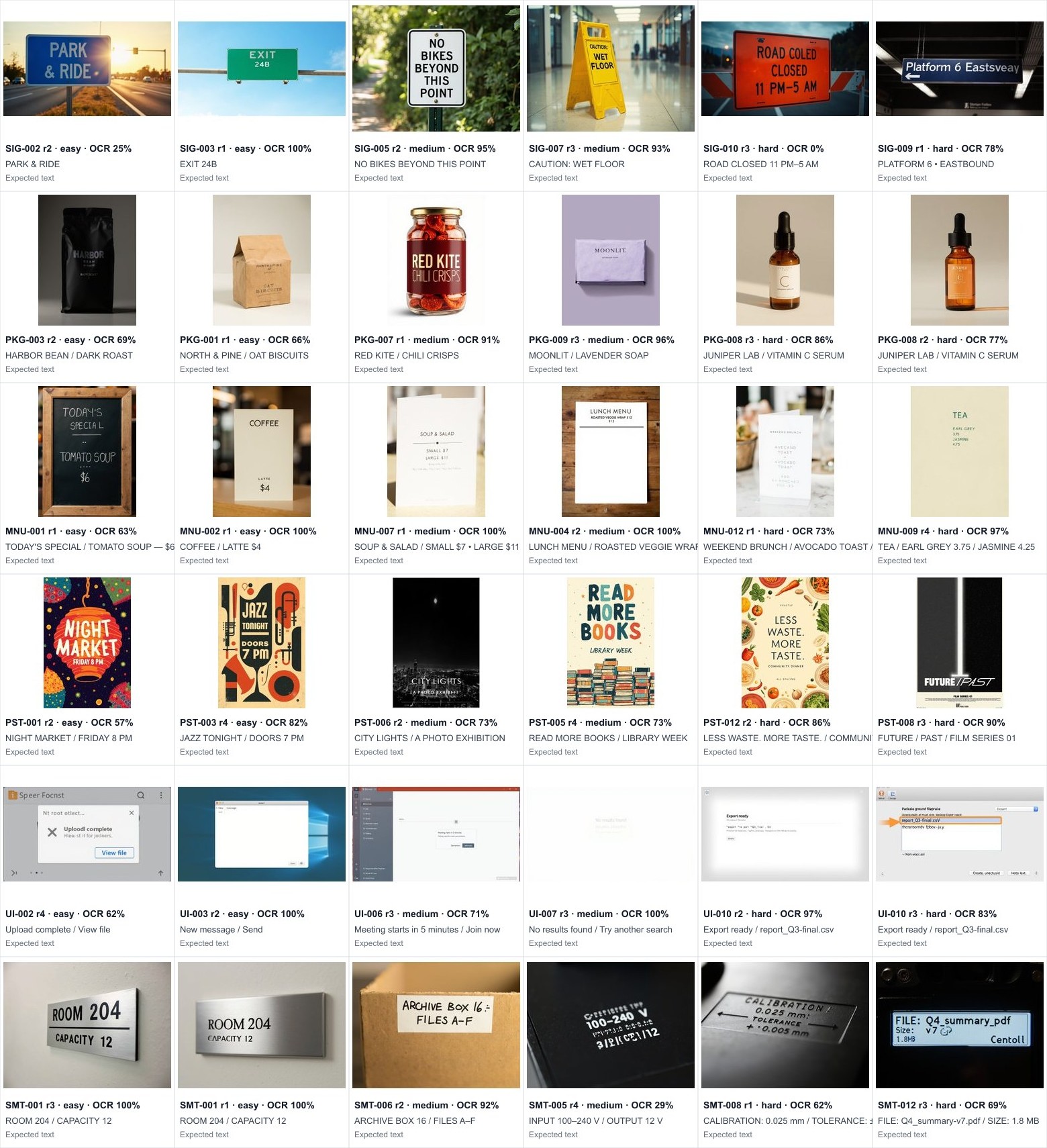
Menus scored highest partly because the requested text was usually placed on a flat, front-facing surface with conventional typography. One “COFFEE / LATTE $4” card passed exactly, as did a “LUNCH MENU / ROASTED VEGGIE WRAP $12” result. Interface screens ranked second, but the model often filled surrounding space with invented labels. Packaging and posters landed near 30%, where a correct headline could coexist with a misspelled subtitle.
Signage’s 13.46% result deserves context. The random audit showed both real generation mistakes and OCR failures. “ROAD CLOSED 11 PM–5 AM” became a sign containing “ROAD COLED” plus a duplicated “CLOSED.” “PLATFORM 6 • EASTBOUND” visibly became “Platform 6 Eastsveay.” Those are genuine model errors. In contrast, a multiline “PARK & RIDE” sign looked correct to a reviewer but scored only 25% character accuracy because glare, perspective and line layout confused OCR. “NO BIKES BEYOND THIS POINT” also appeared visually correct while missing strict machine credit. That is why the OCR score should not be treated as a perfect measure of human-readable output.
Difficulty had a clear effect
Strict accuracy fell as strings became longer and more punctuation-heavy: 41.91% for easy prompts, 38.24% for medium prompts and 24.58% for hard prompts. Hard cases combined mixed case, dates, decimals, symbols or multiple required lines. In the sample, “FILE: Q4_summary-v7.pdf” lost critical filename characters, while a calibration plate altered punctuation and measurement formatting. These are small visual differences with large operational consequences.
What Image-01 does well—and where it fails
Image-01 regularly produced convincing compositions, lighting, materials and typography styles for the low per-image cost. The best menu cards, posters and room plaques looked usable as design directions. Mean character accuracy reached 72.89%, far above the 33.51% strict rate, which shows that many failures were near misses rather than unreadable output.
However, near-correct is not sufficient for a price, safety instruction, URL, serial number or button label. The visual audit exposed four recurring failure modes:
- Letter substitution: one or two plausible-looking characters changed inside an otherwise correct phrase.
- Punctuation loss: bullets, dashes, underscores, decimal points and symbols were omitted or replaced.
- Duplication and invented copy: the required text appeared alongside extra pseudo-words, especially in packaging and interfaces.
- Small-text collapse: technical labels and secondary lines turned into visual texture rather than dependable language.
The benchmark’s automated exact score does not penalize every extra invented word; it asks whether required strings are present. The qualitative 36-image audit therefore adds an important warning: an image can pass the expected-string check yet still contain unwanted microcopy. Conversely, stylization, glare or curved surfaces can make Tesseract miss text a person can read. Manual review is required in both directions.
Recommendations for production use
- Generate the visual, typeset the final text separately. For ads, packaging and thumbnails, remove or cover generated lettering and add verified text in Figma, Canva, Photoshop or your rendering pipeline.
- Keep generated copy short. One large phrase on a flat surface is safer than several small lines, although this test shows it is still not guaranteed.
- Generate four or more candidates. Variation helped find usable compositions, but only 5.33% of prompts passed in at least three of four outputs; retries are not a substitute for verification.
- Run OCR as a gate, then review visually. Reject mismatched required strings automatically, but inspect OCR failures and all surrounding text manually.
- Avoid generated text for safety or factual precision. Do not rely on the model alone for medicine labels, electrical ratings, legal copy, prices, dates or navigation signs.
- Archive originals and prompts. Preserve API settings, hashes and source files so later edits and claims remain traceable.
For wider workflow and product context, read how to use MiniMax AI. Check our MiniMax pricing guide before budgeting a larger run.
Cost and reproducibility files
The test cost $1.05: 300 images multiplied by the $0.0035 Image-01 rate listed when we ran it. This excludes taxes and any account-specific arrangement. Prices can change, so verify the official pay-as-you-go pricing before repeating the benchmark. The documented image endpoint accepted up to nine outputs per request; we used four and observed 75 successful request trace IDs.
Package maintenance — verified July 30, 2026: The published benchmark result is unchanged. The repaired README now matches the actual run: 75 requests with n=4, producing 300 images. No seed was supplied; MiniMax generated random seeds, but those seed values were not recorded in the bundle, and run_config.json records seed: null. Use run_benchmark_n4.py for generation and score_ocr_tesseract.cjs for OCR scoring. The repaired ZIP removes references to nonexistent runner/scorer files, adds an offline validator and an internal SHA-256 manifest. ZIP SHA-256: 62ef922873c3d7d05ccb1413f0d86dc2972e5aa70f553c4e59634dc2275f021c.
The download contains the 75 prompts, 300-row manifest, unrounded OCR outputs, summary metrics and scoring scripts. API credentials are not included. If you rerun the test, record the date because model behavior and service configuration can change.
Limitations
This is a text-rendering benchmark, not a general image-quality score. We did not compare Image-01 with another model, use subject-reference generation, test non-English scripts or ask blind reviewers to rate aesthetics. OCR is imperfect, and our two-pass Tesseract protocol can produce false negatives on stylized, low-contrast, curved or perspective text. The 36-image audit was deterministic and qualitative; it was used to identify examples and metric limitations, not to create a second headline percentage. Finally, four outputs per prompt estimate variability but cannot describe every possible generation.
FAQ
Can MiniMax Image-01 generate readable English text?
Yes, but not reliably enough for unsupervised production. In this benchmark, 33.51% of expected strings were exact and 15% of images reproduced every required string exactly.
Which type of text worked best?
Menus performed best at 53.23% strict exact-string accuracy, followed by interface text at 42.71%. Signage and small technical text performed worst.
Does generating four images solve spelling errors?
No. Only 5.33% of prompts produced whole-image strict passes in at least three of four attempts. More candidates improve selection, but every candidate still needs validation.
Should I trust OCR to approve generated text automatically?
Use OCR as a first gate, not the final decision. Our audit found genuine image errors and OCR false negatives. A human should inspect required text, extra invented text and visual usability.
How much did the 300-image benchmark cost?
It cost $1.05 at the published $0.0035-per-image rate available on July 28, 2026. Confirm current pricing in the official documentation before running it again.
Verdict
MiniMax Image-01 is inexpensive and capable of producing strong visual concepts, but this test does not support treating it as a dependable typesetting system. Its 72.89% mean character accuracy shows substantial language ability; its 33.51% strict exact rate shows the gap that matters in real work. The safest workflow is to use Image-01 for composition and style, then replace text with controlled typography—or validate every string with OCR plus human review before use.