

Last verified: August 13, 2026
The practical answer to how to use MiniMax AI is to begin with the task, not with a model name. MiniMax offers several separate routes: a general-purpose agent, a desktop creative workspace, a coding product, video and audio tools, and an API for developers. They share parts of the MiniMax model family, but they are not interchangeable interfaces.
If you only want to test a short text prompt, you can use the independent demo on the MiniMax AI homepage. For files, repositories, video, speech, music, team workflows, or production integrations, use the relevant official product described below.
Independent-site notice: MiniMax-AI.chat is an independent informational website and is not owned by, operated by, or affiliated with MiniMax. Product availability, model access, quotas, and prices can change; confirm important details on the linked official MiniMax pages.
Choose the right MiniMax product
| Your goal | Best route | Why | Official entry point |
|---|---|---|---|
| Ask questions, research, write, or run a general multi-step task | MiniMax Agent / Mavis | A general-purpose agent experience rather than a developer console | Open MiniMax Agent |
| Create a multimodal campaign or coordinate creative agents | MiniMax Design | Desktop workspace for planning, generating, organizing, and editing creative assets | Open MiniMax Design |
| Work primarily on a codebase | MiniMax Code via the current MiniMax Agent entry point | Repository and software-agent workflows; MiniMax still lists Code, but the former Code URL currently redirects to Agent | Open the current official route |
| Generate or animate video | Hailuo AI | Consumer-facing image-to-video and text-to-video workflows | Open Hailuo AI |
| Create still images inside a larger workflow or application | MiniMax Design or Image API | Design coordinates creative assets; Open Platform exposes supported image models programmatically | Open the image guide |
| Generate speech, voices, or music | MiniMax Audio | Dedicated speech and music interfaces | Open MiniMax Audio |
| Build MiniMax into your own app | MiniMax Open Platform | API keys, model endpoints, usage records, and developer documentation | Open the platform |
Need installation and store links rather than a workflow guide? Use the separate MiniMax app and download guide. That page covers access methods without turning this guide into a duplicate download page.
1. Use MiniMax Agent (Mavis) for general tasks
Choose MiniMax Agent when the task is broader than a single chat response: research, analysis, documents, websites, presentations, or a multi-step deliverable. MiniMax called the upgraded Agent Mavis in its May 2026 Agent Team announcement, while the live service and documentation still use the MiniMax Agent name. Agent can perform coding work and connect to services such as GitDesign or GitLab; choose MiniMax Code when the repository and software-development loop are the center of the task.
- State the outcome: “Prepare a two-page launch brief,” not “Tell me about launches.”
- Add context: audience, market, product, source notes, and what the agent may assume.
- Set constraints: language, length, tone, deadline, and required sections.
- Request evidence: ask it to separate supplied facts, external findings, and assumptions.
- Review before use: check names, dates, calculations, claims, and citations yourself.
For a small task, one precise instruction is usually better than a long sequence of vague messages. For a multi-stage task, ask for a plan first, approve or adjust it, and then let the agent proceed in defined phases.
For the product’s task modes and limitations, continue to the independent MiniMax Agent guide.
2. Use MiniMax Design for multimodal creative work
MiniMax Design—formerly presented on this site as MiniMax Hub—is MiniMax’s current desktop route for projects that combine copy, images, video, audio, and editing. MiniMax presents Design as a local-first creative workspace with agent orchestration, reusable Skills, a shared canvas, local-file access, and asset management. “Local-first” describes the project and asset workflow; it is not evidence that cloud model inference runs fully offline. Review the applicable privacy and processing terms before opening sensitive files.
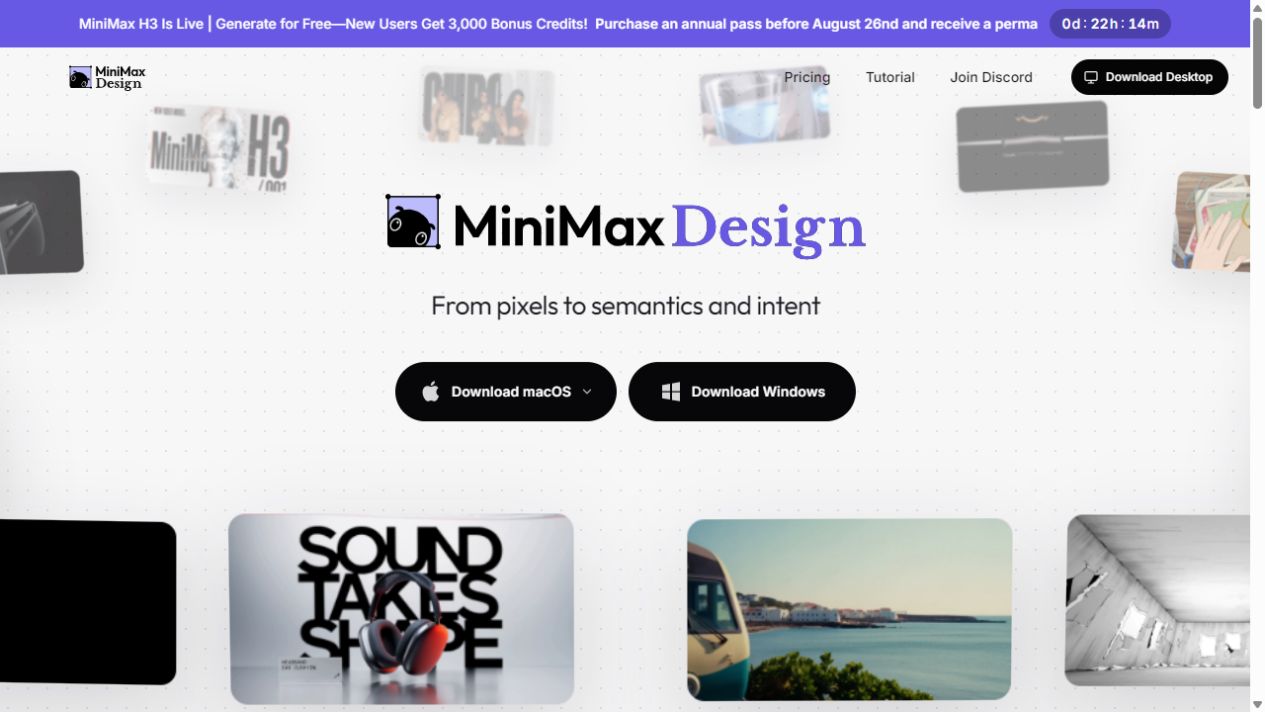
- Install the correct macOS or Windows build from the official Design site.
- Create a project and describe the campaign, video, or asset set you need.
- Add only the local files needed for the task.
- Let Design break the objective into copy, image, video, or audio workstreams.
- Review checkpoints and redirect the agents when a creative decision needs human judgment.
- Merge, edit, organize, and export the approved assets.
For installation requirements, Agent Teams, Skills, local files, and Media Plan details, follow the dedicated MiniMax Design guide.
3. Use MiniMax Code for repositories and software tasks
MiniMax still lists MiniMax Code as a coding product for software work that needs repository context, tools, and iterative checks. However, the official code.minimax.io entry point redirects to agent.minimax.io as of August 26, 2026. This page therefore does not promise a separately accessible Code interface: use the live MiniMax Agent route and confirm the coding features available to your account.
A safe first coding workflow is:
- Open a version-controlled repository and make sure you can restore the checked-in state.
- Ask the tool to inspect the project and explain the relevant files before editing.
- Define acceptance criteria, tests, and files that must not change.
- Request a small, reviewable patch.
- Run the project’s own test, type-check, lint, and build commands.
- Review the diff for security, dependency, and data-migration risks before merging.
Read the separate MiniMax Code guide for setup and coding-specific workflows. Never give an agent unrestricted production credentials merely to test a change.
4. Use Hailuo for video and MiniMax Audio for sound
Hailuo video workflow
Use Hailuo when the deliverable is a video clip. Begin with the required aspect ratio and destination, then describe the subject, action, setting, camera behavior, lighting, and visual style. If you start from an image, use an image-to-video mode and describe the intended motion rather than repeating details already visible in the frame.
Six-second vertical product shot, close-up of a blue running shoe on wet pavement, slow push-in, subtle water droplets, overcast cinematic light, stable logo shape, no text overlays.
Create short variations before spending credits on a longer production. Check hands, faces, logos, object continuity, unintended text, and rights to the source image. The video API is documented separately in MiniMax’s official video-generation guide.
For a new developer video workflow, start by evaluating MiniMax-H3 on the V2 API. Use the Hailuo 2.3 model guide only when maintaining a legacy V1 integration.
Speech and music workflow
Use MiniMax Audio when the output is spoken audio, a voice workflow, or music. For text to speech, prepare clean text, choose the correct language and voice, and test a short excerpt for pronunciation, pace, and emotional direction. For music, specify genre, mood, instrumentation, structure, and intended duration. Confirm that you have permission before cloning or imitating a real person’s voice, and label synthetic audio where law or context requires it.
The MiniMax Audio guide covers the dedicated product in more detail.
5. Use the MiniMax API for your own application
Choose the Open Platform when you need server-side automation, repeatable parameters, usage tracking, or integration with an existing application. The basic sequence is to create a platform account, select the correct service region, create the appropriate credential, store it on the server, choose a compatible endpoint, and test with a small request.
- Use the Global platform at platform.minimax.io or the Mainland China platform associated with your account; do not mix their API domains.
- Create a pay-as-you-go API Key, or use a Token Plan Subscription Key for an eligible plan. The two credential types are not interchangeable.
- Keep the key in a server environment variable or secret manager—not in browser JavaScript, a public repository, or a mobile app bundle.
- Select the OpenAI-compatible or Anthropic-compatible base URL required by your integration.
- List the models available to your actual key and region instead of assuming every catalog model is enabled.
- Add timeouts, retries with backoff, logging that redacts secrets, cost controls, and human review where the output matters.
Start with the site’s MiniMax API guide. For the exact Global and Mainland China domains, headers, and credential differences, use the focused API key and base URL reference. Billing choices are kept on the separate MiniMax pricing guide.
Choose a model only after choosing the product
A product is the interface or workflow you open—such as Design, Code, Hailuo, Audio, Agent, or the Open Platform. A model is an underlying AI system used for a type of generation or reasoning. A product can expose multiple models, and a model may appear in more than one product or API format.
The table above covers the practical creation and developer routes used in this guide. MiniMax also operates Talkie, a character-chat and entertainment product; it is separate from the production workflows covered here.
| Model family | Use it for | Important selection note |
|---|---|---|
| MiniMax M3 | Language, coding, tool use, and agentic tasks | MiniMax documents native text, image, and video input with text output and a hosted context window of up to one million tokens. Availability and limits depend on the route. |
| MiniMax M2.7 | Language, coding, agent, and office-style work | A listed text-model alternative when this page was verified; compare latency, quality, and cost on your own workload. |
| MiniMax M2.5 | Existing integrations | Official documentation marked M2.5 as legacy when this page was verified; do not begin a new dependency without checking migration guidance. |
| MiniMax H3 | New video API integrations | Current MiniMax video model on V2; supports text-to-video, first and/or last frames, and multimodal references, with 768P or 2K output for 4–15 seconds. |
| Hailuo 2.3 / 2.3 Fast / 02 | Existing V1 video integrations | MiniMax lists these API models under Legacy Models; standard Hailuo 2.3 supports text-to-video and image-to-video, while Fast is listed for image-to-video. |
| Speech 2.8 HD / Turbo | Text to speech | Choose between quality- and speed-oriented variants based on the applicable official product or API documentation. |
| Music 3.0 | Music generation | Use the music product or supported API flow, not a text-only chat route. |
| Image-01 | Image generation | Check the applicable input, output, and billing rules before building a production workflow. |
Consult MiniMax’s official model catalog for the live list, then test the model available in your own account. For a deeper look at the flagship text model, read the independent MiniMax M3 guide.
Five practical MiniMax workflows
Research brief
Use Agent for a research plan and synthesis. Supply the question, geography, date range, allowed sources, and required citations. Ask it to mark unresolved claims instead of filling gaps with guesses. Verify every consequential claim against the original source.
Creative campaign
Use Design to turn one campaign brief into copy, image concepts, storyboards, clips, and audio candidates. Approve the brand direction before generating many assets, then retain a record of licensed inputs and final human approvals.
Repository change
Use Code with a narrow issue, acceptance tests, and a clean version-control state. Have it explain the existing behavior, implement a small patch, run the project’s checks, and summarize remaining risk.
Short product video
Create the approved source image and shot list first, then use Hailuo for motion variations. Generate short clips, select the best take, and complete factual text, pricing, logos, and legal notices in a conventional editor.
Application feature
Use the API from your backend. Validate input, constrain output, protect the credential, set a budget, log request identifiers rather than sensitive prompts, and create a fallback for unavailable models or rate limits.
Free access, credits, and paid usage
“Can I use MiniMax AI for free?” does not have one permanent answer across every product. A product may offer free access, introductory credits, feature limits, or a paid plan, while API usage and media generation can follow different billing systems. Availability may also differ by account and service region.
Before starting a large job, check the official checkout or platform console for the allowance shown there, renewal period, eligible models, rate limits, credit expiry, and overage behavior. MiniMax maintains an official API pricing overview and a separate Token Plan introduction. Our pricing page explains how the pieces fit together without putting changing price figures into this workflow guide.
Safety and quality checklist
- Minimize data: submit only what the task requires, and remove personal or confidential details where possible.
- Protect credentials: keep API keys and production secrets out of prompts, screenshots, client code, and repositories.
- Confirm rights: use images, voices, music, code, and documents you are permitted to process.
- Verify output: check factual claims, citations, calculations, translations, and code before publishing or deploying.
- Disclose synthetic media: follow applicable platform rules and laws for AI-generated or altered content.
- Keep human approval: do not let an AI system make unsupervised medical, legal, financial, employment, safety, or account-access decisions.
- Review official terms: retention, training, privacy, and enterprise controls can differ by product and plan.
Before adding real customer, employee, or company material, review the site’s what not to paste into MiniMax AI checklist.
Common setup mistakes
| Mistake | Better approach |
|---|---|
| Opening the first MiniMax interface and expecting every capability | Route the task to Agent, Design, Code, Hailuo, Audio, or the API first. |
| Treating a product name as a model name | Choose the workflow product, then select an available model inside it. |
| Using the text demo for files or media | Use the official product that supports the required input and output. |
| Putting an API key in front-end code | Call MiniMax from a protected backend and issue your own authenticated requests from the client. |
| Mixing Global and Mainland China domains | Use the console, key, and API host that belong to the same service region. |
| Assuming a long context window removes the need for selection | Provide only relevant material, label sources, and ask for traceable outputs. |
| Publishing the first generation | Review accuracy, rights, safety, brand consistency, and technical quality. |
Frequently asked questions
What is the easiest way to start using MiniMax AI?
For a short text test, use the independent demo on this site’s homepage. For a real project, choose the official product by output: Agent for general tasks, Design for multimodal creative projects, Code for repositories, Hailuo for video, Audio for speech or music, and Open Platform for an application integration.
Do I need to download MiniMax?
Not for every route. Some MiniMax experiences are web-based, while Design and certain app or coding workflows may require installation. Use the official product page or the app guide to identify the right platform and build.
Which MiniMax product should I use for coding?
Use MiniMax Code for repository-level work and a coding-agent workflow. Use a text model through the API if you are building coding assistance into your own application. A short chat can explain a snippet, but it does not replace repository context, testing, and diff review.
Which MiniMax product creates videos?
Hailuo AI is the dedicated consumer video route. MiniMax Design can coordinate video as part of a broader creative project, and the Open Platform exposes supported video-generation APIs for developers.
Is MiniMax Design fully offline?
Do not assume so. MiniMax describes Design as local-first and highlights local-file workflows, but that wording does not establish that every model operation is processed offline. Check the official product documentation and privacy terms in effect for the specific feature and plan.
Can I use MiniMax AI for free?
Free access or introductory allowances may exist for particular products or accounts, but media generation, API usage, limits, and paid plans are separate and can change. Check the relevant official product or platform console before beginning a large task.
Can I use the same MiniMax API key everywhere?
No. The credential must match its service region and billing type. A pay-as-you-go API Key and a Token Plan Subscription Key are separate credentials, and integrations can also require different compatible base URLs or environment-variable names.
How do I choose a MiniMax model?
Start with the modality: text and agents, video, image, speech, or music. Then compare the models available in the chosen product or returned by the API for your account. Test quality, latency, limits, and cost on a small representative workload before committing.