

Independent guide: MiniMax-AI.chat is an independent informational website. It is not operated by, affiliated with, or endorsed by MiniMax. Always verify downloads, billing, and release information on MiniMax’s official domains.
Last verified: September 30, 2026. The official changelog lists v3.1.0, released September 30, as the latest build. It refreshes MiniMax Code’s look, upgrades agent features, and introduces M Plan. v3.0.74 (September 28) added the new M3.1-Flash-Preview model, covered below. The v3.0.66 notes (H3 video generation, Site management, Fork & Rewind, Plan mode, and more) and earlier v3.0.63–v3.0.54 notes remain valid historical entries.
Quick answer
MiniMax Code is MiniMax’s desktop AI Agent app for software development, everyday workflows, automation, and remote collaboration. It combines chat, local project context, file operations, terminal sessions, browser previews, skills, memory, and automation in one desktop workspace. It is not the MiniMax M3 model, the MiniMax API, or the browser-based MiniMax Agent experience.
The official desktop documentation supports macOS and Windows. It does not document a native Linux build. MiniMax also provides separate web and mobile Agent experiences; those should not be described as native MiniMax Code desktop versions.
MiniMax Code status at a glance
| Question | Verified answer |
|---|---|
| What is it? | A desktop AI Agent application working with local project workspaces and desktop tools. |
| Latest build | v3.1.0, released September 30, 2026. |
| Latest feature-bearing release | v3.1.0, released September 30, 2026. |
| Official desktop platforms | macOS Apple silicon, macOS Intel, and Windows 64-bit. |
| Minimum operating systems | macOS 11 Big Sur or later; Windows 10 or later. |
| Native Linux build | Not documented on the official download page reviewed for this guide. |
| API key required? | Not for the normal signed-in MiniMax-managed route; MiniMax API-key and custom BYOK options are available. |
| Browser Control and Computer Use status | Browser Use 2.0 supports multiple tabs inside the built-in browser. The changelog does not explicitly confirm that broader system-wide Computer Use has returned. |
| Open source? | The public MiniMax Code GitHub repository is an issue tracker, not published desktop-app source. |
Official MiniMax Code download and system requirements
Start from the official download and installation guide or follow MiniMax’s current product navigation. MiniMax provides a Global route for users outside mainland China and a China route for mainland China network environments.
| Platform | Official requirement | Installer guidance |
|---|---|---|
| macOS on Apple silicon | macOS 11 Big Sur or later | Use the arm64/Apple-silicon package. |
| macOS on Intel | macOS 11 Big Sur or later | Use the x64/Intel package. |
| Windows | Windows 10 or later | Use the current Windows 64-bit installer. |
| Linux | No native desktop support is documented | Do not label third-party integrations or the web Agent as a Linux MiniMax Code build. |
- Download the package matching the device architecture.
- On macOS, open the DMG and move the app to Applications. On Windows, run the installer and follow the prompts.
- Launch MiniMax Code and sign in with a MiniMax account.
- Install updates when the app notifies you, or check for updates in settings.
Do not download repackaged installers from unofficial software directories. A third-party tool using a MiniMax model or Subscription Key is not the MiniMax Code desktop application.
MiniMax Code vs MiniMax Agent, M3, the API, and third-party tools
| Product or layer | Primary role | Important boundary |
|---|---|---|
| MiniMax Code | Desktop Agent app for local projects, deliverables, automation, and remote collaboration. | A product interface and runtime, not a foundation model. |
| MiniMax Agent web/mobile | Separate browser and mobile Agent experiences. | Do not assume desktop files, terminal, browser panel, BYOK, or release version applies to them. |
| MiniMax M3 | A coding, agentic, and multimodal model offered through MiniMax products and APIs. | Model-level capabilities do not prove a desktop feature is enabled. |
| MiniMax API | Programmatic model and multimodal access for developers. | API billing, keys, limits, and context may differ from the signed-in Code experience. |
| Claude Code, Cursor, TRAE, OpenClaw, Codex, and other tools | Third-party coding or agent products that may integrate MiniMax resources. | They remain separate products with their own permissions and behavior. |
The official M3 page says the M3 API supports up to a 1M-token context window, with a guaranteed minimum of 512K in the cited API description. Do not convert that into a promise that every MiniMax Code task, plan, or custom provider exposes the same context.
M3.1-Flash-Preview is available in MiniMax Code
MiniMax’s newest text model, MiniMax-M3.1-Flash-Preview, debuted in MiniMax Code on September 27, 2026, and appears in the v3.0.74 changelog (September 28). MiniMax says the model is available only through its subscription plan and MiniMax Code for now; there is no pay-as-you-go price. Subscribers do not need a separate key inside MiniMax Code; they just sign in.
- Effort levels: the model’s thinking depth can be set to
low,medium,high,xhigh, ormax, and it defaults tomax. Higher levels think longer and use more of your plan. Thinking cannot be switched off. - Choosing effort in the terminal: the changelog documents selecting the model and reasoning effort with
/model, andmcode exec --effortfor a single run. - Launch offers: from October 1 to 7, 2026, all subscribers can use M3.1-Flash-Preview without usage limits in MiniMax Code, and daily check-in points are doubled from September 28 to October 7.
- Context: 1,000,000 tokens, with text, image, and video input.
What changed in MiniMax Code v3.0.66?
Released August 19, 2026, v3.0.66 integrates H3 video generation and adds Site management, Fork & Rewind, a Plan mode that reviews before editing, an MCP Servers configuration page, text-selection comments, and smoother previews. These are MiniMax Code desktop-product features; they do not prove H3 access through every API key, Token Plan, BYOK provider, or third-party coding tool, and they do not explicitly reinstate broader system-wide Computer Use.
What changed in MiniMax Code v3.0.63?
The August 12, 2026 release added Plugin Marketplace, a built-in Review command that links findings to code lines, Red Skill search, conversation jump navigation, multi-tab Browser Use 2.0, improved account, billing, and usage displays, and a custom Windows data directory.
What changed in MiniMax Code v3.0.52?
MiniMax Code 2.0 refers to a desktop-core rebuild introduced in the v3.0.48–v3.0.49 release group. It is not a model name and it is not the current build number. MiniMax reports that the rebuild reduced p95 and p99 first-token latency by more than 90%, reduced stalls, improved conversation-state and tool-call persistence, reduced runtime dependencies, and streamlined Windows installation. These are vendor-reported release-note claims, not independent benchmark results.
Versions v3.0.50–v3.0.51 delivered follow-up fixes. Version v3.0.52 then added four major product features:
- Remote Control for following a running desktop session from a phone.
- Built-in Browser for page and HTML preview, inspection, and debugging inside the app.
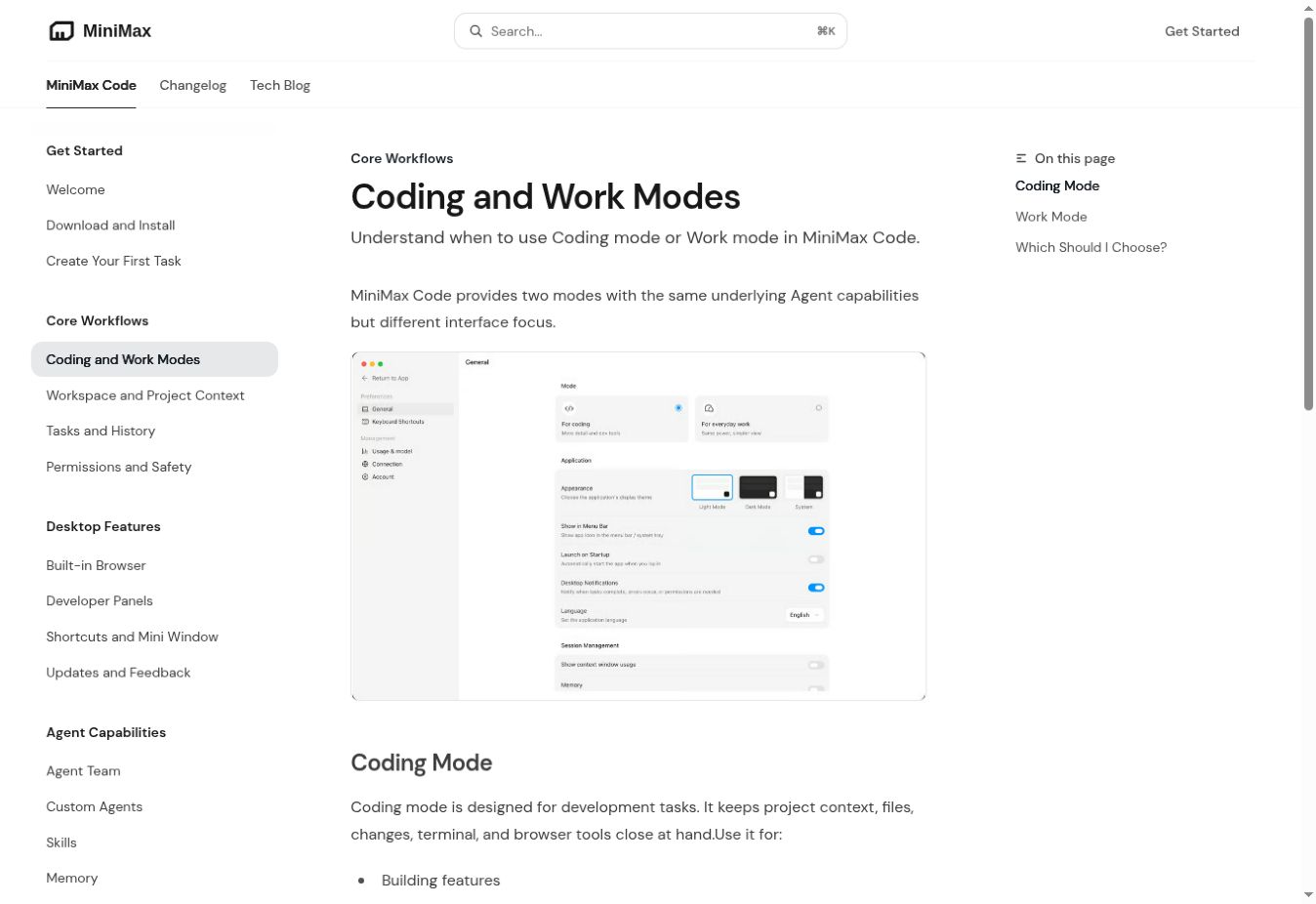
- Coding and Work modes with the same underlying Agent capabilities but different interface focus.
- BYOK model configuration using a MiniMax API key or custom provider details.
Coding Mode vs Work Mode
| Mode | Best for | Interface focus |
|---|---|---|
| Coding | Building features, fixing bugs, running tests and scripts, reviewing diffs, debugging pages or generated HTML. | Project context, files, changes, terminal, Git/worktree context, and browser tools. |
| Work | Research, documents, spreadsheets, content creation, and everyday automation. | Task progress and final deliverables with less development-oriented detail. |
Choose the mode by task, not by assumed model quality. The official modes guide says both modes use the same underlying Agent capabilities.
Current MiniMax Code features and boundaries
| Capability | Officially documented behavior | Important boundary |
|---|---|---|
| Local workspace | Read project context, work with files, run commands, create artifacts, and report changes in the selected workspace. | Attach only relevant directories and review permission requests. |
| Files, Changes, and Terminal | Inspect task files, code diffs, and command output from desktop panels. | A visible diff or successful command does not prove correctness. |
| Browser Control | Read pages, fill forms, upload files from the current task or workspace, and check results inside the built-in browser. | The changelog does not explicitly confirm that broader system-wide Computer Use has returned; outward-facing actions require confirmation. |
| Agent Team | Coordinates decomposition, specialized execution, progress tracking, verification, and synthesis. | Multi-agent work can add time, token, handoff, and review cost. |
| Custom Agents | Supports role-specific Agent configurations documented by MiniMax. | Keep instructions, workspace access, and external connections narrowly scoped. |
| Skills and Memory | Supports reusable workflows and retained preferences or project conventions. | Do not store credentials or sensitive client data in memory. |
| Scheduled Tasks | Runs recurring work from the desktop runtime. | The computer must be awake and MiniMax Code must be running. |
| Remote Control | Check progress, send follow-up instructions, approve permissions, and view selected outputs from a phone. | The runtime, terminal, and project files remain on the computer; this is not full remote desktop control. |
| Messaging integrations | Supported channels vary by region and can carry instructions or results. | Review bot credentials, group access, sender identity, and outbound actions. |
| BYOK | Configure a MiniMax API key or a custom provider with connection and model details. | Context, modalities, tool support, privacy, and cost depend on the provider. |
| Feedback | In-app feedback can include task context, diagnostics, screenshots, and system details. | Review attachments and redact secrets or private code before submission. |
Browser Control and the broader Computer Use caveat
MiniMax Code v3.0.54 added Browser Control inside its built-in browser, including reading pages, filling forms, uploading workspace files, and checking results. The changelog does not explicitly confirm that broader system-wide Computer Use has returned.
Do not publish claims that MiniMax Code can control the whole desktop, operate arbitrary native applications, or perform general computer automation unless a newer official MiniMax source explicitly reinstates and documents that capability.
Remote Control: what the phone can and cannot do
Remote Control links a phone to a running MiniMax Code desktop app. Official documentation lists progress checks, follow-up instructions, permission approvals, task outputs, and selected file content. The project runtime and files stay on the computer.
- Do not describe Remote Control as full remote desktop access.
- Do not promise that work continues while the computer is powered off or asleep.
- Treat approval requests on the phone with the same caution as desktop prompts.
- Pair only a device and account you control.
MiniMax-managed access, API keys, and BYOK
The normal signed-in MiniMax Code route can use eligible account resources without asking the user to paste an API key into chat. Current desktop documentation also supports two optional routes:
- MiniMax API key: enter the key in the dedicated settings interface and test the connection.
- Custom provider/BYOK: configure the provider name, base URL, API key, API format, and model information required by that provider.
Do not paste keys into chats, project documentation, source files, or repositories. With BYOK, verify the provider’s context limit, multimodal support, tool compatibility, rate limits, retention policy, and pricing. MiniMax does not state that every provider or model supports every Code feature.
For external API and coding-tool integrations, MiniMax distinguishes a Token Plan Subscription Key from a standard pay-as-you-go API key. The keys are not interchangeable. A MiniMax Code sign-in, a Subscription Key used in another tool, a pay-as-you-go API key, and a custom BYOK provider are separate access paths.
How to create a safer first task
- Update the app. Confirm the installed version in MiniMax Code before following release-specific instructions.
- Choose the mode. Use Coding for repository work and Work for research or deliverables.
- Select the smallest relevant workspace. Do not attach a home directory or unrelated client folders.
- State constraints. Specify allowed files, commands, tests, output format, and actions that require approval.
- Protect secrets. Do not paste credentials into chat or memory or expose an entire
.envfile. If a credential is genuinely required, use the dedicated settings flow, least privilege, and preferably a short-lived secret. - Choose single Agent or Agent Team. Use a team only when the task benefits from clear decomposition and independent review.
- Review every consequential action. Require approval for deletion, overwrite, uploads, external messages, deployment, merges, and access-control changes.
- Validate. Run tests, inspect the final diff, open generated pages, check citations, and keep a rollback path.
Inspect this repository and propose a plan before editing. Work only inside the selected workspace. Make the smallest justified changes, run the relevant tests, report every modified file, and do not delete data, reveal secrets, send external messages, merge, or deploy without explicit approval.
Token Plan pricing and usage limits
MiniMax’s current Token Plan overview lists the following monthly tiers. On September 30, 2026, MiniMax introduced M Plan (Go, Explore, Build) at the same $22, $55, and $132 prices; all three M Plan tiers include M3.1-Flash-Preview. The account usage bar and checkout interface remain the source of truth for an individual account.
| Plan | Listed price | Quota windows | Approximate “Agent usage” label |
|---|---|---|---|
| Plus | $22/month | 5-hour rolling and weekly | 3–4 agents |
| Max | $55/month | 5-hour rolling and weekly | 4–5 agents |
| Ultra | $132/month | 5-hour rolling and weekly | 6–7 agents |
The “3–4 / 4–5 / 6–7 agents” figures are approximate plan guidance, not seats, monthly task allowances, fixed token balances, or guaranteed concurrency. MiniMax’s current documentation ties availability to quota windows and dynamic usage conditions. Eligible resources share the included usage quota, and unused subscription quota does not roll into the next billing cycle.
When the included limit is reached, documented options include waiting for the rolling or weekly window to reset, upgrading, using eligible purchased Credits, or switching an external integration to a pay-as-you-go key. MiniMax recommends pay-as-you-go access, rather than an individual interactive Token Plan, for production workloads. Avoid publishing fixed monthly-token estimates as current guarantees because official estimates have changed across MiniMax documents.
Privacy, local data, and permissions
MiniMax describes the desktop app as primarily using a local runtime and local data directory. That is not a promise of offline model inference, zero transmission, or that all information stays on the device. MiniMax’s privacy policy applies to its desktop services and discusses account, device, IP, usage, log, cookie, local-device, and permitted third-party application data.
- Obtain authorization before attaching private repositories, regulated data, or client material.
- Review reads outside the workspace and any request to edit, delete, upload, or create an external side effect.
- Do not claim zero retention, end-to-end encryption, no model training, or a particular compliance certification unless a current official source explicitly supports that exact claim.
- Review custom-provider privacy terms separately; BYOK changes the service path and may change data handling.
- Keep human sign-off for production deployment and other high-impact actions.
MiniMax Code troubleshooting
| Problem | Current checks |
|---|---|
| Wrong installer or app will not install | Confirm macOS/Windows version and choose Apple-silicon, Intel, or Windows 64-bit from the official route. |
| Existing conversations fail after an update | Install the newest available build and retry. v3.0.50–v3.0.51 specifically addressed post-upgrade LLM service and interrupted-conversation issues. |
| Agent cannot see project files | Confirm the selected workspace, file permissions, ignored paths, and whether the request is outside the allowed directory. |
| Command or edit requires approval | Review the exact target and effect. Approval prompts are expected for sensitive actions; do not disable safeguards merely to avoid prompts. |
| Browser Control cannot complete a step | Confirm the correct page and task workspace are open, then inspect the browser result and terminal output. Browser Control can read pages, fill forms, upload workspace files, and check results; publishing, sending, and submitting require confirmation. |
| BYOK connection test fails | Verify base URL, API key, API format, model name, network environment, and provider compatibility, then run the built-in connection test. |
| Scheduled task did not run | Confirm the task is enabled, the computer is awake, and MiniMax Code is running. |
| Remote Control does not connect | Confirm the desktop app is running and follow the current pairing instructions in the app. |
| Usage limit reached | Check both the 5-hour rolling window and weekly quota, credit balance, current plan, and the options shown in the account usage panel. |
| Crash, bug, or repeatable product error | Use in-app Feedback and review attached screenshots, task context, system details, and diagnostic logs for secrets before submitting. The public GitHub repository can be searched for known issues but is not the app’s source repository. |
Is MiniMax Code open source?
Do not describe the desktop app as open source. MiniMax previously announced an intention to open-source its Agent work, but the official public MiniMax Code repository reviewed for this guide functions as an issue tracker and does not publish the desktop application source or GitHub releases. Open-weight or open-source MiniMax models are a separate subject.
Frequently asked questions
Does MiniMax Code require an API key?
Not for the normal signed-in MiniMax-managed route. Current versions also let users optionally configure a MiniMax API key or custom BYOK provider in model settings.
What is the latest MiniMax Code version?
As of September 30, 2026, the official changelog lists v3.1.0, released September 30, as the latest build and latest release with documented new features.
Is MiniMax Code available on Linux?
MiniMax’s current desktop documentation supports macOS 11 or later and Windows 10 or later. It does not document a native Linux desktop build. The web Agent, mobile Agent, API integrations, and third-party coding tools are not native Linux MiniMax Code builds.
Is the built-in browser the same as Computer Use?
Not necessarily. MiniMax Code v3.0.54 documented Browser Control inside the built-in browser, and v3.0.63 added multi-tab Browser Use 2.0. Neither note explicitly confirms that broader system-wide Computer Use has returned.
Can I control MiniMax Code when my computer is off?
No official documentation reviewed for this guide supports that claim. Remote Control connects to a running desktop app, and scheduled desktop tasks require the computer to remain awake with MiniMax Code running.
Does all MiniMax Code data stay local?
MiniMax says the app primarily uses a local runtime and data directory, but its privacy documentation also covers account, device, usage, and permitted local or third-party application data. Do not describe the product as fully offline or zero-data-transfer without a newer explicit commitment.
Does MiniMax Code use MiniMax M3?
MiniMax promotes M3 access through MiniMax Code, and since September 27, 2026 MiniMax Code also offers the newer M3.1-Flash-Preview. Model availability can depend on the current product configuration, plan, region, and provider. MiniMax Code is the application; M3 and M3.1-Flash-Preview are models.
Are the listed Agent figures guaranteed simultaneous agents?
No. MiniMax presents them as approximate plan guidance. They are not documented as seats, guaranteed concurrency, or fixed completed-task allowances.
Conclusion
MiniMax Code is now broader than a coding-only harness: its current desktop documentation covers software development, Work-mode deliverables, Agent Teams, browser-assisted debugging, recurring tasks, remote collaboration, and flexible model configuration. Its value depends on matching the mode and model to the task, limiting permissions, protecting secrets, and independently validating the result.
For current release status, downloads, quota behavior, and billing, rely on the official changelog, download guide, and account UI rather than screenshots or old plan summaries.
Official sources
- Welcome to MiniMax Code
- MiniMax Code changelog
- Download and installation guide
- Coding and Work modes
- Permissions and Safety
- Built-in Browser
- Remote Control
- Agent Team
- Custom models and BYOK
- Token Plan and Credits in MiniMax Code
- Token Plan overview and prices
- MiniMax M3 model page
- MiniMax Agent privacy policy
Full-guide fact-check: July 25, 2026. Release-status refresh: August 13, 2026. Release numbers, installers, prices, quotas, provider support, and policies may change after publication.