

Last verified: August 26, 2026
MiniMax Design is MiniMax’s desktop AI creation platform for commercial content workflows. It is the current name used for the product that MiniMax introduced in June 2026 as MiniMax Hub. The app coordinates planning, copy, images, storyboards, video, voiceover or music, review, and export on a connected canvas. MiniMax currently lists downloads for macOS 13 or later and Windows 10 or later on x64 systems.
MiniMax Design is a product workspace—not the MiniMax H3 model, the Hailuo AI website, MiniMax Code, or the MiniMax API. This guide explains those boundaries, the current membership prices and credit examples, and what MiniMax has not publicly confirmed.
Independent-site disclosure: MiniMax-AI.chat is an independent informational website. It is not owned by, operated by, affiliated with, or endorsed by MiniMax. We do not host the installer or sell MiniMax Design credits. Download and payment links below go to MiniMax’s official websites.
MiniMax Design at a glance
| Question | Verified answer |
|---|---|
| Current product name | MiniMax Design |
| Former name | MiniMax Hub |
| What it is | A desktop, Agent-guided multimodal creative-production workspace |
| Official product page | design.minimax.io |
| Official desktop systems | macOS 13+; Windows 10+ x64 |
| Main workflow | Brief → task plan → connected media work → review → export |
| Billing route | MiniMax Design Membership and media credits |
| Stable public free allowance | Not published; the official site offers a free starting option but does not state an evergreen quota |
| Linux or mobile build | No official MiniMax Design build found |
| Checked | August 26, 2026 |
In this guide
- What MiniMax Design is
- Why MiniMax Hub is now MiniMax Design
- Features and workflow
- Official download and system requirements
- Membership prices, credits, and limits
- Local files, offline use, and privacy
- MiniMax Design vs Hailuo, H3, Code, and API
- Limitations and checks before paying
- Frequently asked questions
What is MiniMax Design?
MiniMax describes Design as an AI-native creation platform. You can start with an idea or a detailed brief; a main Agent interprets the goal, breaks it into tasks, and can match tasks to models. Manual model selection is also advertised. Copy, image, video, and audio work can then be coordinated in one project rather than treated as unrelated generations.
The official workflow covers creative direction, model-assisted execution, human review, and delivery. This makes MiniMax Design an orchestration product. It may use models such as H3, but it is not itself a foundation model or a simple one-shot video generator. MiniMax’s current company directory describes it as an AI Agent platform for commercial content creation.
MiniMax Hub is now MiniMax Design
On June 29, 2026, MiniMax published a report from the Shanghai International Film Festival describing the official launch of MiniMax Hub as a desktop, Agent-based multimodal creative platform. Current MiniMax product pages and the main company directory now use the name MiniMax Design for that product.
MiniMax did not publish a dated rename notice on the official pages reviewed for this guide, so we do not claim an exact rename date. Older tutorials, installer links, and URLs may still contain “Hub,” but current descriptions, screenshots, and pricing should use “MiniMax Design.” This page keeps its existing /guide/minimax-hub/ address so people following older links can still find the corrected guide.
What can MiniMax Design do?
Turn a brief into a production plan
Provide a sentence, references, or a complete creative brief. MiniMax says the main Agent can interpret the intended result, decompose the work, and recommend models. A useful brief should specify the audience, message, formats, aspect ratios, language, duration, brand constraints, and required deliverables.
Coordinate text, image, video, and audio
The official site describes four dedicated creative roles: Copy, Image, Video, and Audio. These can work on connected parts of a project, including scripts, storyboards, images, timelines, voiceovers, and music. The product page calls this parallel processing; it does not guarantee that every job will run simultaneously or finish at the same speed.
Build on a connected canvas
The canvas brings planning and media nodes into one visible workflow. It can connect research, scripts, storyboards, visual assets, video, sound, editing, and delivery. This is especially useful when a campaign needs several related outputs rather than one isolated image or clip.
Reuse Skills and plugins
Skills are reusable workflow methods. MiniMax currently shows examples for promotional video, ecommerce product images, audiobooks, storyboards, image remixing, and music-video creation. The catalog and individual Skill versions can change. A Design Skill should not be described as persistent memory or scheduled automation unless the live app explicitly documents that behavior.
Connect local assets and review checkpoints
MiniMax says canvas assets can auto-save locally and Agents can access local files. It also advertises review checkpoints before the workflow moves forward. Those checkpoints are where you should approve claims, visual identity, likenesses, music or voice rights, continuity, captions, and final delivery settings.
Illustrative example: a 15-second product-launch ad
This is an illustrative workflow, not a MiniMax-AI.chat hands-on benchmark. A marketer could provide a product brief, reference photos, audience, claims, and a 9:16 delivery requirement. The Agent could map the job into copy, key visuals, a six-shot storyboard, video clips, voiceover, music, captions, and export. A human should approve the claims and creative direction before expensive generations, then review the final product appearance, timing, audio rights, and platform disclosures.
MiniMax Design download and system requirements
| Platform | Officially stated requirement | What is not established |
|---|---|---|
| macOS | macOS 13+ | No current public minimum for RAM, GPU, free storage, or processor tier |
| Windows | Windows 10+ x64 | Windows on ARM support is not stated |
| Linux | No official Design build listed | Do not install an unofficial package presented as a MiniMax release |
| iOS or Android | No official Design mobile build listed | Do not confuse Design with Hailuo or other MiniMax apps |
Use the live download controls on the official MiniMax Design website. Do not save or redistribute a version-specific installer URL because MiniMax can replace builds while keeping the main download page current.
- Confirm that your operating system matches a listed platform.
- Download only from the official MiniMax Design site.
- Install the app and sign in through the onboarding shown in the current build.
- Review every local-file permission before granting access.
- Start with a small, non-sensitive test project and check the displayed model and credit deduction before scaling up.
MiniMax Design pricing, credits, and current limits
MiniMax Design uses a separate creator-facing membership and media-credit system. The following is a dated snapshot of the official membership page as displayed on August 26, 2026. It is not a permanent price promise.
| Plan | Monthly billing | Yearly billing displayed | Credits per month |
|---|---|---|---|
| Starter | $10.50/month | $100.80/year ($8.40/month equivalent) | 10,000 |
| Plus | $76/month | $729.60/year ($60.80/month equivalent) | 87,000 |
| Pro | $215/month | $2,064/year ($172/month equivalent) | 270,000 |
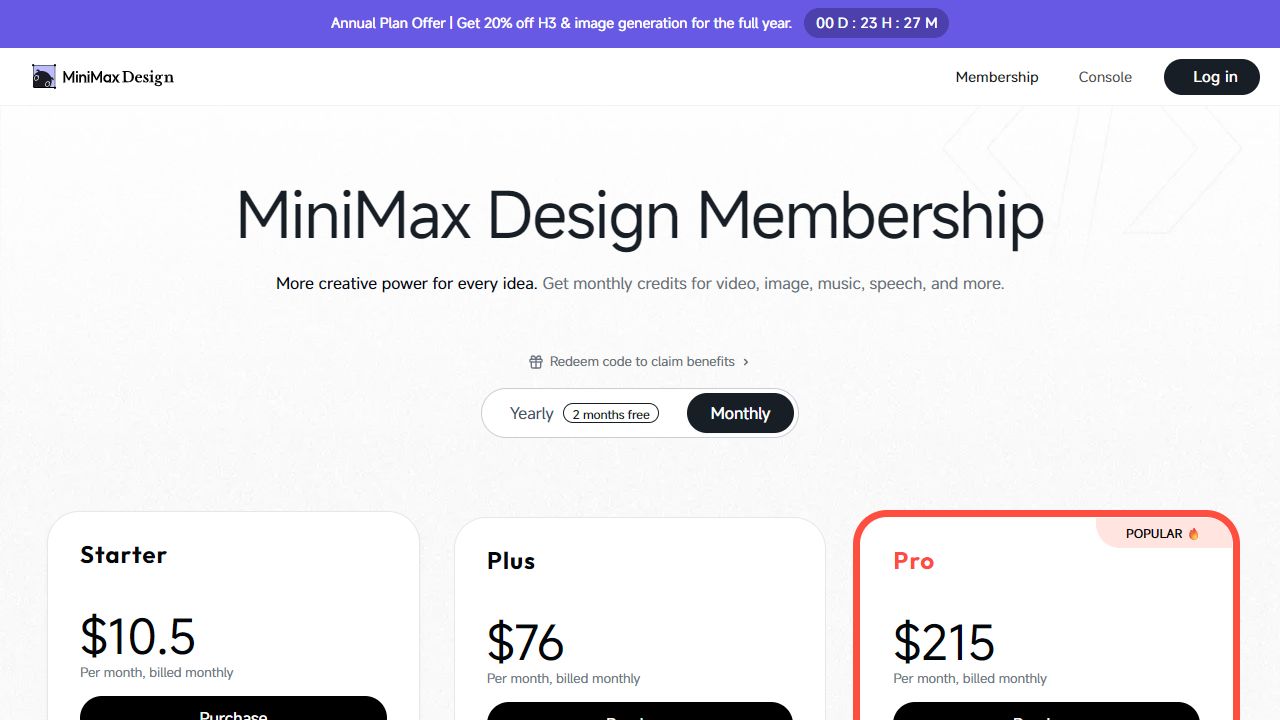
The official page also showed an annual-plan promotion for H3 and image generation. Because the checkout labels it as a limited offer and displays a countdown, this guide does not treat that discount as a permanent plan benefit.
What the current credits can represent
MiniMax publishes model-output examples for the full monthly allowance. These are estimates, not guaranteed output quantities; the checkout says actual quantity varies by parameters.
| Plan | MiniMax H3 at 2K | MiniMax H3 at 768P | MiniMax Speech 2.8 |
|---|---|---|---|
| Starter | 83 seconds | 143 seconds | 200,000 characters |
| Plus | 725 seconds | 1,243 seconds | 1.74 million characters |
| Pro | 2,250 seconds | 3,857 seconds | 5.4 million characters |
The same checkout currently lists image, music, and speech models as well as video. Model availability, versions, per-generation credit costs, output counts, and parameters can change. Check the model selector and cost shown inside your account before approving a large run.
Additional credits
The official checkout currently offers additional credit purchases and says purchased credits are valid for one year: $10 for 9,250 credits, $50 for 46,250, $200 for 194,250, and $500 for 508,750. Treat these as an August 26 snapshot and verify the live offer before paying.
Is MiniMax Design free?
The official product and AI Design pages currently offer an option to start creating for free. MiniMax does not publish a stable, evergreen free-credit allowance on the public pages reviewed here. Free access, included models, introductory credits, and regional availability may therefore differ by account or change over time.
Design credits are not API credits
MiniMax Open Platform separately uses API keys, pay-as-you-go billing, and Token Plan subscriptions. No current official source reviewed for this guide states that Design membership credits can be transferred to an API balance. Treat the two billing systems as separate unless your account explicitly states otherwise.
Is MiniMax Design local, offline, or private?
Verified: MiniMax advertises a local-first Asset Center, says canvas assets can auto-save locally, and says Agents can access local files. Not established: that every model runs on your computer, that generation works without an internet connection, that files never leave the device, or that a specific retention period applies to every model offered inside Design.
The credit-backed model catalog indicates that hosted services are involved in at least some workflows. “Local assets” and “local model inference” are different claims. Before processing confidential material, review the current in-app notice and applicable terms, test with non-sensitive files, and use the narrowest folder access that works. Our what not to paste into MiniMax AI checklist covers credentials, customer data, unpublished business information, private likenesses, and unnecessary metadata.
MiniMax Design vs Hailuo AI, H3, MiniMax Code, and API
| Product or layer | Main role | Important boundary |
|---|---|---|
| MiniMax Design | Desktop, Agent-guided multimodal creative production | A product workspace, not a foundation model |
| Hailuo AI | Consumer-facing web and app experience for visual generation | A separate interface and workflow; see our Hailuo video prompt guide |
| MiniMax H3 | Open-weight video-and-audio generation model family | Can be used through supported products and deployment routes; it is not MiniMax Design itself |
| MiniMax Code | Coding and repository-focused Agent workspace | Choose it for software engineering rather than a media-production canvas |
| MiniMax Agent | General multi-step knowledge and creation tasks | Broader task surface rather than the dedicated Design production workflow |
| MiniMax Open Platform | Programmatic access to supported models | Separate API keys, billing, rate limits, and developer workflow |
If your work is mainly voice, speech, or music, start with the MiniMax Audio guide. If the output combines copy, storyboards, images, clips, sound, editing, and delivery, MiniMax Design is the more relevant product to evaluate.
Who is MiniMax Design for?
MiniMax Design is a plausible fit for short-form video, ecommerce content, storyboards, brand campaigns, short drama, and creator workflows that need several media types from one brief. Marketing teams can use it to organize related assets, while YouTube creators can connect scripts, visuals, audio, and editing. See our dedicated guides for marketing agencies and YouTube creators.
It is a weaker fit for developers who need API integration, coding-centered work, users who require a documented Linux build, or organizations that must prove all inference stays offline. A browser-only one-shot generator may also be simpler when you do not need a connected production workflow.
Limitations and checks before paying
- No complete public hardware matrix: MiniMax does not currently state minimum RAM, GPU, disk space, or recommended performance tiers on the product page.
- No documented Linux or mobile build: only macOS 13+ and Windows 10+ x64 are listed.
- No full-offline guarantee: local asset storage does not prove local inference or zero upload.
- Variable model costs: credit consumption and estimated output depend on model and parameters.
- Changing catalog and promotions: check the live app and checkout before budgeting a production.
- Human review remains necessary: verify product claims, typography, likenesses, voice or music rights, captions, and continuity.
- This is not a hands-on benchmark: MiniMax-AI.chat has not independently tested the current Design build for speed, failure rate, output quality, or exact credit deduction. Vendor productivity claims are not independent evidence.
Update history
| Date | Verified change |
|---|---|
| June 29, 2026 | MiniMax published its official launch account for MiniMax Hub, describing it as a desktop Agent-based multimodal creative platform. |
| August 26, 2026 | Current official product surfaces were rechecked under the MiniMax Design name. Download requirements, membership prices, monthly credits, model-output examples, and additional-credit offers were verified again. |
Future entries should record substantive product, pricing, availability, or policy changes. Merely changing the “last updated” date is not evidence that the facts were revalidated.
Frequently asked questions
Is MiniMax Hub now called MiniMax Design?
Yes. MiniMax officially launched the desktop product as MiniMax Hub in June 2026, while its current product page and company directory use MiniMax Design. An exact public rename-announcement date was not found.
Where can I download MiniMax Design?
Download it from design.minimax.io. Avoid third-party installer directories and do not treat this independent guide as a download host.
Is MiniMax Design free?
The official site currently offers a way to start creating for free, but it does not publish a stable public allowance that applies indefinitely to every account. Check the app for the models and credits available to you.
Does MiniMax Design work on Windows and Mac?
MiniMax currently lists macOS 13+ and Windows 10+ x64. The public page does not provide a complete minimum-hardware specification.
Is MiniMax Design available on Linux?
No official Linux build is listed on the current MiniMax Design download page.
Does MiniMax Design work fully offline?
MiniMax documents local asset storage and local-file access, but the public pages reviewed here do not establish that every model runs locally or that all generation works offline.
Is MiniMax Design the same as Hailuo AI or MiniMax H3?
No. MiniMax Design is a desktop creative workspace, Hailuo AI is a separate consumer-facing visual-generation experience, and H3 is a video-and-audio generation model family that can be accessed through supported products or deployment routes.
Is MiniMax Design open source?
MiniMax does not describe the Design desktop product as open source on the official pages reviewed for this guide. Do not confuse the product with MiniMax H3, whose model weights are available under a separate Community License.
Official sources
- MiniMax Design product page and official downloads
- MiniMax Design AI workflow and free-start information
- MiniMax Design Membership, credits, model examples, and additional-credit offers
- MiniMax company product directory
- Official June 2026 MiniMax Hub launch account
- Official MiniMax H3 page and Design access route
- Hailuo AI official website
- MiniMax Open Platform model catalog
Practical next step: verify your operating system, download MiniMax Design from the official site, and test one small non-sensitive brief. Before scaling, record the model selected, credits deducted, processing time, retries, failures, and whether the export format matches your production workflow.