

Last verified: September 30, 2026
MiniMax M3.1-Flash-Preview is MiniMax’s newest M-series language model, announced on September 27, 2026. Its API name is MiniMax-M3.1-Flash-Preview. MiniMax describes it as a “frontier multimodal coding model with 1M context window and tunable thinking depth,” built for agentic reasoning, tool use, coding, and long-context work.
The catch is access. In MiniMax’s own words, the model “is available only through M Plan and MiniMax Code for now.” M Plan is the subscription MiniMax introduced on September 30 to build on its Token Plan, at unchanged prices; Token Plan subscribers also got the model under their existing plans. There is no pay-as-you-go price for it, and there are no official benchmark scores, speed figures, or open weights yet. This guide covers what MiniMax has confirmed, how to reach the model today, what that costs, and where the gaps are.
What MiniMax has confirmed, and what it hasn’t
Searches for “MiniMax M3.1” turn up plenty of speculation. This table separates the official record from the blanks, as of September 30, 2026.
| Question | Official answer |
|---|---|
| Model name | MiniMax-M3.1-Flash-Preview |
| Announced | September 27, 2026, on MiniMax’s official X accounts |
| Context window | 1,000,000 tokens |
| Input types | Text, images, and video |
| Thinking | Always on; depth set with effort: low, medium, high, xhigh, or max (default max) |
| Where to use it | MiniMax Code, or your own tools with an M Plan Subscription Key (M Plan builds on the former Token Plan) |
| Pay-as-you-go API price | Not published. The model is absent from MiniMax’s pay-as-you-go price list. |
| Benchmarks | Not published. |
| Output speed (tokens per second) | Not published. MiniMax lists about 100+ tps for M3 but gives no figure for M3.1-Flash-Preview. |
| Parameter count and architecture | Not published. |
| Open weights | Not announced. |
| Final (non-preview) M3.1 release date | Not announced. |
If you see a specific M3.1 price per million tokens, a benchmark score, or a claim that an anonymous model on a third-party leaderboard “was M3.1,” treat it as unverified. None of that appears in MiniMax’s documentation or announcements.
MiniMax M3.1 release date and rollout
MiniMax did not publish a blog post or a release-notes entry for this model. The launch happened through its X accounts and the MiniMax Code changelog. Here is the dated sequence from those official sources.
| Date (2026) | What happened | Official source |
|---|---|---|
| September 27 | MiniMax’s agent account: “MiniMax’s latest text model, M3.1-Flash-Preview, debuts today on MiniMax Code.” | @MiniMaxAgent on X |
| September 27 | MiniMax’s main account: “MiniMax-M3.1 Flash Preview is now live on the Token Plan,” available “under your existing Token Plan subscription, no extra setup required.” | @MiniMax_AI on X |
| September 28 | MiniMax Code desktop v3.0.74 lists the model under “What’s New.” MiniMax CLI 0.5.7 adds it to the built-in model catalog. Token Plan quotas were reset for all users. | MiniMax Code changelog |
| September 28 – October 7 | Double daily check-in points in MiniMax Code. | MiniMax Code changelog |
| September 30 | MiniMax Code v3.1.0 introduces M Plan, which “builds on Token Plan with unchanged subscription prices and text usage quotas.” | MiniMax Code changelog |
| October 1 – 7 | “All subscribers can use M3.1-Flash-Preview without usage limits in MiniMax Code.” | MiniMax Code changelog |
Some news write-ups give the date as September 27 in China time. MiniMax’s X posts were published on September 27 in both UTC and China time, so September 27, 2026 is the release date to cite.
How to use M3.1-Flash-Preview: two ways in
Both official routes run through a subscription. You cannot switch this model on by adding funds to a pay-as-you-go wallet.
Route 1: MiniMax Code
MiniMax Code is MiniMax’s own agent app, and it is where the model debuted. MiniMax’s M Plan FAQ says that after subscribing, you simply sign in to MiniMax Code to get your plan benefits: “No separate subscription or Subscription Key is needed.” According to MiniMax Code’s changelog, the terminal version lets you pick the model and reasoning effort with /model, and mcode exec --effort sets it for a single run. Our MiniMax Code guide covers downloads, setup, and the difference between the desktop app and the web agent.
Route 2: your own tools, with a Subscription Key
To use the model in Claude Code, Cursor, Codex, OpenCode, or your own scripts, copy the Subscription Key from your plan details and point the tool at MiniMax’s compatible endpoints. The Anthropic-compatible base URL is https://api.minimax.io/anthropic, and the OpenAI-compatible one is https://api.minimax.io/v1. The following request is adapted from MiniMax’s documentation; we have not run it ourselves:
curl https://api.minimax.io/anthropic/v1/messages \
  -H "Authorization: Bearer $MINIMAX_SUBSCRIPTION_KEY" \
  -H "Content-Type: application/json" \
  -d '{
    "model": "MiniMax-M3.1-Flash-Preview",
    "output_config": {"effort": "high"},
    "max_tokens": 4096,
    "messages": [{"role": "user", "content": "Review this function for edge cases: ..."}]
  }'
On the OpenAI-compatible Chat Completions route, the same setting is called reasoning_effort. On the OpenAI Responses route it is reasoning.effort. Thinking comes back separately from the answer: as a thinking block on the Anthropic route and in reasoning_content on the OpenAI route.
Why a pay-as-you-go API key is the wrong key here
MiniMax keeps two kinds of key. A standard API key bills your Open Platform balance at pay-as-you-go rates. A Subscription Key draws on your plan’s usage and any Credits. MiniMax says the two “cannot be used interchangeably.” Because M3.1-Flash-Preview has no pay-as-you-go price and is restricted to the subscription and MiniMax Code, a production app that needs metered billing should stay on MiniMax M3, which does have pay-as-you-go pricing, for now.
What access costs: plan prices, not per-token prices
Since there is no per-token price, the real cost is the subscription. MiniMax’s M Plan page lists three tiers:
| M Plan tier | Monthly | Yearly | Usage | Former Token Plan tier at the same monthly price |
|---|---|---|---|---|
| Go | $22 | $220 | Base | Plus |
| Explore | $55 | $550 | 3× Go | Max |
| Build | $132 | $1,320 | 7.5× Go | Ultra |
- What each tier includes. All three tiers list “Text models, e.g., M3.1 Flash Preview,” image and speech models, web search and multimodal understanding, MiniMax Code, and an API key for AI agents and coding tools. Explore and Build add a “Video model,” which the page’s comparison table and FAQ name as H3. Prices match the changelog’s “unchanged subscription prices.”
- Launch offer. Through October 14, 2026, new M Plan subscriptions and upgrades get 50% off the first month; renewals return to the regular price.
- Annual billing. The yearly prices are labeled “2 months free”: $220, $550, and $1,320 instead of 12 monthly payments.
- Credits. Credit packs cost $5, $25, and $100 at 1,000 Credits = $1 and are valid for 365 days. Plan usage is spent first. MiniMax’s M Plan FAQ says “Credit packs support the M3.1 Flash Preview text model,” so Credits can cover overflow once plan usage runs out.
- Usage windows. Text use counts against a 5-hour window and a weekly window. Unused usage does not carry over.
Our MiniMax M Plan guide explains Subscription Keys, windows, and Credits in detail, and the MiniMax pricing guide covers every pay-as-you-go rate.
A 1,000,000-token context window
MiniMax lists a context window of 1,000,000 tokens, the same ceiling as M3, “for long documents, codebases, and multi-step agent sessions.” Two practical points follow.
- Bigger context burns plan usage faster. The M Plan FAQ names context length as one of the main drivers of consumption. Feeding a whole repository into every turn will eat into your 5-hour window.
- A ceiling is not a quality guarantee. MiniMax has published no long-context test for this preview. Our M3 guide explains why retrieval, trimming, and clear instructions still matter even with a 1M window.
The five effort levels, and when to use each
The most visible new control is effort. MiniMax says it accepts low, medium, high, xhigh, and max. “Higher levels think more thoroughly and produce more output tokens at higher latency,” and “when omitted, the default is max.” Thinking cannot be switched off: sending thinking: {"type": "disabled"} or effort: "none" returns a 400 error. MiniMax’s advice is to lower the effort level instead.
MiniMax does not publish a per-task mapping, so the column on the right is our practical starting point, not an official rule:
| Effort | What MiniMax says | A sensible place to start |
|---|---|---|
low | Least thinking, lowest latency | Renaming, formatting, short explanations, quick lookups |
medium | More thinking than low | Small bug fixes, single-file edits, drafting tests |
high | Deeper reasoning | Multi-file changes, code review, tool-calling tasks |
xhigh | Deeper still | Tricky debugging, refactors that touch many modules |
max | Most thorough; the default | Hard problems where a wrong answer costs more than waiting |
Effort also affects your plan. The M Plan FAQ says “the higher the thinking depth for M3.1 Flash Preview, the more thinking content it generates and the more it consumes,” and suggests “a lower thinking depth for simple tasks.” Since the default is max, setting effort explicitly is the easiest way to stretch a subscription.
M3.1-Flash-Preview vs M3: what’s different
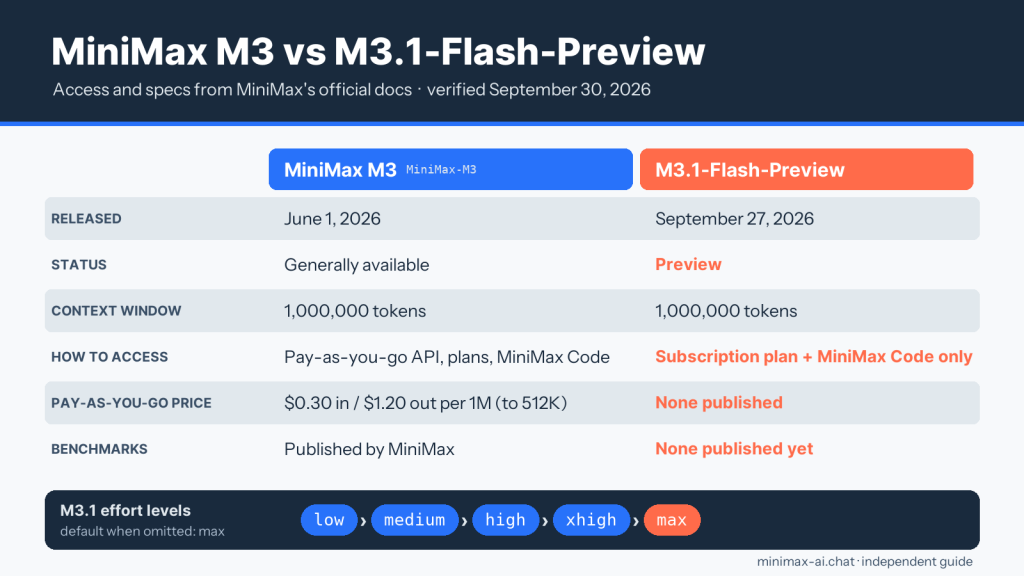
| Item | MiniMax M3 | MiniMax M3.1-Flash-Preview |
|---|---|---|
| Released | June 1, 2026 | September 27, 2026 |
| Status | Listed model with pay-as-you-go pricing | Preview, subscription and MiniMax Code only |
| Context window | 1,000,000 tokens | 1,000,000 tokens |
| Inputs | Text, images, video | Text, images, video |
| Pay-as-you-go price | $0.30 input / $1.20 output per 1M tokens (standard tier, up to 512K input) | None published |
| Thinking | Can be enabled or disabled; defaults differ by endpoint | Always on; five effort levels, default max |
| Published speed | About 100+ tokens per second | None published |
| Open weights | Yes, under MiniMax’s license | None announced |
| Official benchmarks | Published by MiniMax at launch | None published |
The purpose is different too. M3 is MiniMax’s general frontier model, and you can build a metered product on it. MiniMax pitched M3.1-Flash-Preview more narrowly: its agent account called it “built for everyday development… from quick bug fixes to full features,” and its main account called it “faster, lighter, and built for teams running high-volume, latency-sensitive workloads.” Those are MiniMax’s descriptions, not measurements. Until MiniMax publishes numbers, “Flash” tells you what the model is aiming for, not how fast it actually is.
Both models remain listed. MiniMax’s model table shows M3.1-Flash-Preview first and says that M3, M2.7, and M2.7-highspeed “also remain available.” For M3’s pricing, license, self-hosting, and caveats, read the full MiniMax M3 guide.
MiniMax M3.1 benchmarks: none published yet
MiniMax has not published a single benchmark score for M3.1-Flash-Preview: no SWE-bench, no coding leaderboard entry, no speed test. Its announcement and documentation describe the model only in qualitative terms. We are not going to fill that gap with guesses, and you should be wary of any page that does.
For context on the model family, our benchmarks section has independent tests of the previous model, M3. These describe M3, not M3.1-Flash-Preview:
- MiniMax M3 tool-calling benchmark (100 schemas, 300 runs)
- MiniMax M3 vision benchmark (180 OCR, chart, and screenshot tests)
- M3 Standard vs Priority latency test (400 requests)
If you have access through a subscription, the most useful benchmark is your own. Take ten real tasks from your backlog, run them on M3 and on M3.1-Flash-Preview at two effort levels, and compare accepted results, retries, and how much of your 5-hour window each run used. Our guide to testing an AI on your own repository walks through a fair setup.
Living with a preview model
- It can change without notice. “Preview” and “for now” are MiniMax’s words. Behavior, availability, and the model itself may shift before a final M3.1 release, and MiniMax has not said when that will be.
- No metered production route. Without a pay-as-you-go price, you cannot bill customers per request against it through MiniMax. MiniMax describes its subscription as designed for individual, interactive developer use and recommends pay-as-you-go for production.
- Usage limits and rate limits. Plan windows cap how much you can use, and MiniMax may apply dynamic rate limiting at peak times, separate from your plan balance.
- Thinking is mandatory. Every call spends reasoning tokens. For simple, latency-sensitive tasks, a lower effort level is the only lever.
- Little public evidence. With no benchmarks or model card, you are the evaluator. Review code changes the same way you would review a new teammate’s work.
- Data handling. Code and files you send go to MiniMax’s service under its terms. Keep secrets, credentials, and regulated data out of prompts.
MiniMax M3.1 FAQ
When was MiniMax M3.1 released?
MiniMax released M3.1-Flash-Preview on September 27, 2026, first in MiniMax Code and on its Token Plan subscription. A final, non-preview M3.1 has not been announced.
Is “MiniMax 3.1” the same as M3.1-Flash-Preview?
People searching for “MiniMax 3.1” or “M3.1 Flash” are usually looking for this model. The only M3.1 model MiniMax has released is MiniMax-M3.1-Flash-Preview.
How much does M3.1-Flash-Preview cost?
It has no per-token price. You pay for an M Plan subscription: Go, Explore, or Build at $22, $55, or $132 a month, or $220, $550, or $1,320 a year. These match the former Token Plan Plus, Max, and Ultra prices. MiniMax Code sign-in is included with the plan.
Can I call it with a pay-as-you-go API key?
MiniMax says it is available only through its subscription plan and MiniMax Code for now, and it does not appear on the pay-as-you-go price list. Use a Subscription Key, or use M3 if you need metered API billing.
What are the MiniMax M3.1 benchmark results?
There are none from MiniMax yet. Any specific score you see is not from an official source. Our benchmarks cover M3, the previous model.
What is the context window?
1,000,000 tokens, the same as M3.
Which effort level should I use?
The default is max. Drop to low or medium for routine edits and questions, and keep high, xhigh, or max for hard debugging and multi-step agent work. Lower effort also uses less of your plan.
Can I turn thinking off?
No. MiniMax says the model “requires adaptive thinking” and returns a 400 error if you try to disable it. Use effort: "low" instead.
Is M3.1-Flash-Preview open source?
MiniMax has not announced open weights for it. M3’s weights are available under MiniMax’s own license; see the M3 guide.
Can I try it for free?
A little. MiniMax’s M Plan comparison table includes a Free column that lists M3.1 Flash Preview as “Limited” in MiniMax Code, without an API key; heavier use needs a paid tier. MiniMax Code also runs daily check-in points and, from October 1 to 7, 2026, unlimited M3.1-Flash-Preview use for subscribers. The free chat demo on the MiniMax-AI.chat homepage does not use this model.
Official sources and verification
Last verified: September 30, 2026
Every fact on this page comes from the MiniMax sources below, checked on the date above. The effort-level suggestions and testing advice are our own editorial guidance.
- MiniMax text-generation guide: model name, 1M context, inputs, effort levels, default, thinking limits, access wording.
- M Plan page: Go / Explore / Build monthly and yearly prices, what each tier includes, the Free column, and the first-month offer.
- Token Plan price page: the former Plus / Max / Ultra tiers at $22 / $55 / $132 and Credits packs.
- M Plan overview and M Plan FAQ: tiers, included models, usage windows, effort and usage, credit-pack coverage, Subscription Keys.
- Pay-as-you-go price list: no M3.1-Flash-Preview entry; M3 rates.
- MiniMax Code changelog: v3.0.74 (September 28), v3.1.0 and M Plan (September 30), launch offers.
- @MiniMaxAgent launch post and @MiniMax_AI Token Plan post, both September 27, 2026.
For the wider lineup, browse the MiniMax models directory. Found something out of date? Tell us through the corrections page.