

Last verified against official MiniMax pages: September 30, 2026.
MiniMax M Plan is MiniMax’s monthly or yearly subscription for individuals. One plan gives you MiniMax’s own agent app, MiniMax Code, plus a Subscription Key you can plug into Claude Code, Cursor, Codex, and other AI tools. Instead of paying per request, you get a usage allowance that resets on a 5-hour window and a weekly window.
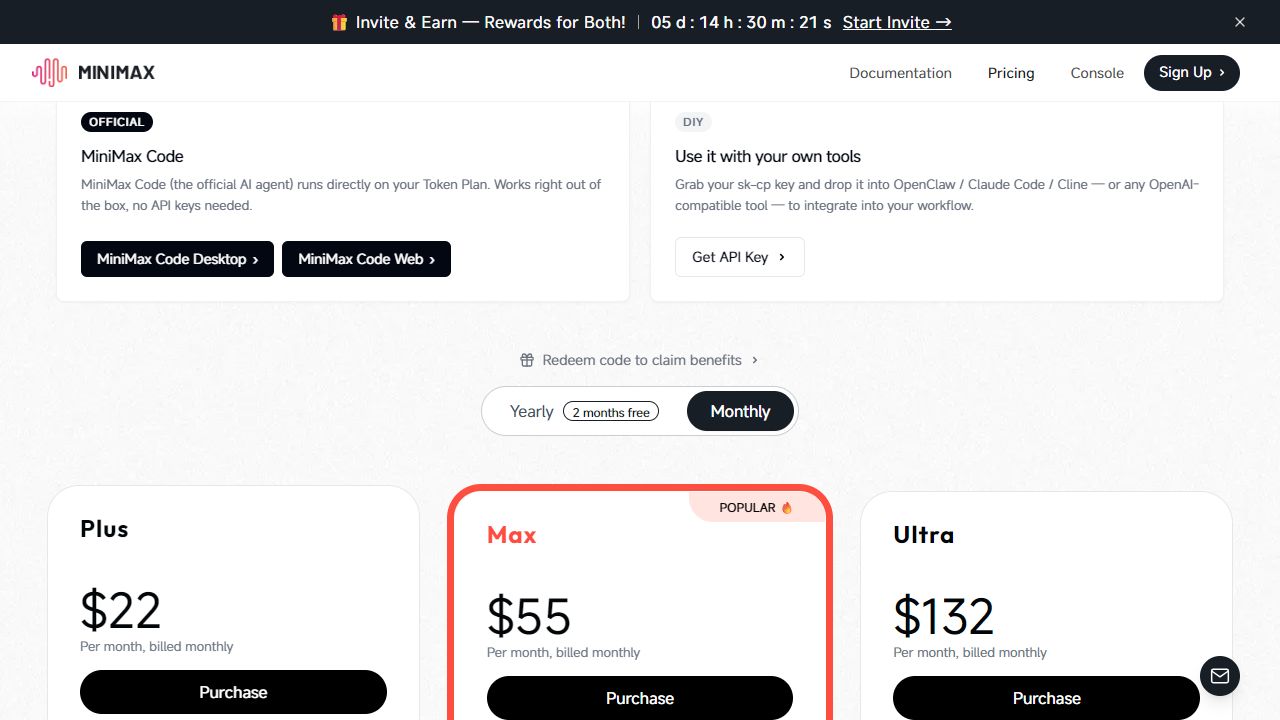
M Plan is the new name and shape of what MiniMax used to sell as Token Plan. MiniMax introduced it on September 30, 2026, saying it “builds on Token Plan with unchanged subscription prices and text usage quotas.” The tiers were renamed from Plus, Max, and Ultra to Go, Explore, and Build, and the monthly prices stayed at $22, $55, and $132. The biggest additions are a video model in the two upper tiers and the new M3.1-Flash-Preview text model, which is available only through M Plan and MiniMax Code for now.
Confirm the final price, tax, and terms in MiniMax’s checkout before you buy; this page summarizes MiniMax’s own pages as of the date above.
M Plan tiers compared: Go, Explore, and Build
| Tier | Monthly | Yearly | Usage | What’s included |
|---|---|---|---|---|
| Go “For light use” | $22 | $220 | Base allowance | Text models (e.g., M3.1 Flash Preview); image and speech models; web search and multimodal understanding; MiniMax Code on web, desktop, TUI, iOS, and Android; API key for AI agents and coding tools |
| Explore “For everyday use” | $55 | $550 | 3× Go | Everything in Go, plus a video model |
| Build “For heavy use” | $132 | $1,320 | 7.5× Go | Everything in Explore, plus priority access during peak hours and early access to new features |
- Yearly billing is labeled “2 months free”: each yearly price equals ten monthly payments. The page shows $264, $648, and $1,560 struck through, which is twelve months at the monthly rate.
- Launch offer: on monthly billing, the page currently shows “M Plan: First month 50% off, then full price. Offer ends Oct 14,” which puts the first month at $11, $27.50, or $66.
- Free access: the page’s comparison table also has a Free column. It lists MiniMax Code on web, desktop, iOS, and Android and the MiniMax Code CLI, with “Limited” M3.1 Flash Preview and image and speech models. It has no API key and no video model.
- Music: MiniMax says all Music-series models are discontinued on M Plan from August 20, 2026, and points users to MiniMax Audio or the open-source MiniMax-Music3 model.
How much “usage” is in each tier is not published as a token count. MiniMax says consumption varies with the model, context length, task complexity, and, for M3.1-Flash-Preview, the thinking depth you choose. Video generation “consumes far more than text.”
From Token Plan to M Plan: what the old tier names mean
If you subscribed before September 30, 2026, or you are reading older guides, you will still see the Token Plan names. MiniMax’s Token Plan price page is still online and lists the former tiers at the same monthly prices:
| Former Token Plan tier | Monthly price | M Plan tier at the same price | Token Plan page’s “best for” description |
|---|---|---|---|
| Plus | $22 | Go | Personal projects and prototyping |
| Max | $55 | Explore | Daily coding with agents and multimodal work |
| Ultra | $132 | Build | Heavy Agent workflows and extended sessions |
The two pages do not describe coverage the same way. The Token Plan page lists “M3 / M2.7 / image / speech” and says “a small number of special models (MiniMax H3, voice design, rapid voice cloning, etc.) are not currently supported.” The M Plan pages list M3.1 Flash Preview as the text model and add a video model to Explore and Build. When the two disagree, check the plan details in your own account; the M Plan page is the one MiniMax currently offers for purchase.
Which video model does M Plan include?
Here is exactly what MiniMax’s pages say:
- The Explore and Build tier cards list “Video model”; the Go card does not.
- The M Plan page’s comparison table has a row called “Video model H3,” checked for Explore and Build only.
- The M Plan FAQ says: “Explore and Build also include the H3 video model, while Go does not include a video model.”
- The M Plan overview’s model table shows Video model: “Not included” for Go and “H3” for Explore and Build.
None of these pages mentions H3 Max, so do not assume it is covered. Separately, MiniMax’s Video Generation guide and V2 API reference still say: “To use MiniMax H3 or MiniMax H3 Max, please select the Pay-as-you-go API.” MiniMax has not reconciled that API note with the M Plan pages. Before relying on a Subscription Key for direct V2 video API calls, confirm it in your plan details or with a small test request. Video counts against the weekly window only, not the 5-hour window. See our MiniMax H3 guide for the model itself.
Subscription Key vs pay-as-you-go API key
M Plan uses a Subscription Key, which you find in Plan Details after subscribing. Pay-as-you-go uses a standard Open Platform API Key. MiniMax says the two cannot be used interchangeably:
| Key | What it draws on | Best for |
|---|---|---|
| Subscription Key | Included M Plan usage first, then any credit packs. Endpoints with pay-as-you-go prices deduct from plan usage at the corresponding endpoint price. | Coding agents and AI tools you use interactively |
| Standard API Key | Your Open Platform account balance, at pay-as-you-go rates | Production apps, automation, batch jobs, and resources outside M Plan coverage |
You do not need either key to use MiniMax Code with your plan; MiniMax says you simply sign in. The Subscription Key is only for connecting other tools. If your account balance is still being charged after you subscribe, MiniMax’s FAQ says the usual cause is a tool still configured with a pay-as-you-go key. Full pay-as-you-go rates are in our MiniMax pricing guide.
How M Plan usage windows work
| 5-hour window | Weekly window | |
|---|---|---|
| Applies to | Non-video models: text, image, audio | All models, including video |
| Starts | With your first use | With your first use |
| Length | 5 hours | 7 days |
| When it ends | Usage resets to your tier’s full limit | Usage resets to your tier’s full limit |
- The two windows reset independently; a 5-hour reset does not restore weekly usage.
- Unused usage does not carry over to the next window or the next billing period.
- Usage is shared across every tool you connect: MiniMax Code, Claude Code, Cursor, and the rest all count against the same limits.
- Rate limits are separate. You can be throttled during peak traffic even with usage left; MiniMax says this typically recovers within about a minute.
- Check usage on the plan usage page, with
mmx quotain MiniMax CLI, or through MiniMax’stoken_plan/remainsAPI endpoint.
Credit packs
Credit packs are a separate prepaid balance used through the same Subscription Key. They cover eligible overflow once your plan usage runs out.
| Pack | Price | Credits | Validity |
|---|---|---|---|
| Starter | $5 | 5,000 | One year from purchase |
| Growth | $25 | 25,000 | One year from purchase |
| High Volume | $100 | 100,000 | One year from purchase |
- Rate: 1,000 Credits = $1, deducted at each resource’s pay-as-you-go list price.
- Coverage: MiniMax says credit packs support “the M3.1 Flash Preview text model, the H3 video model, image and audio generation, web search, and multimodal understanding.”
- Order: plan usage is always used first; after that, the Credits that expire soonest are used first.
- Without a plan: credit packs can be bought and used without an M Plan subscription. In MiniMax Code, though, packs bought on their own do not include M Plan member benefits such as extra cloud projects, scheduled tasks, website publishing limits, custom domains, and watermark removal.
What happens when you hit your limit
- Credit packs take over automatically for the models they support.
- Upgrade to a higher tier, from MiniMax Code’s Settings > Usage & Models or from Plan Details. Upgrades take effect immediately, and the unused part of your current plan is prorated; downgrades are not currently supported.
- Wait for the window to reset.
- Switch a tool to pay-as-you-go by replacing the Subscription Key with a standard API Key.
Hitting a limit never charges your account balance by itself: MiniMax says a Subscription Key only uses plan usage and credit packs.
Who M Plan is for, and who should use pay-as-you-go
MiniMax describes M Plan as “designed for individual, interactive developer use” and recommends pay-as-you-go for production. In practice that means:
| Your situation | Better starting point | Why |
|---|---|---|
| Light research, writing, or small code changes | Go | MiniMax’s own usage guide for the entry tier |
| Daily coding, writing, and multi-turn tasks, or you want H3 video | Explore | 3× Go usage and the video model |
| Long-context work, complex coding, or heavy multimodal creation | Build | 7.5× Go usage, priority at peak hours, early access |
| You want to try MiniMax’s newest text model | Any tier, or Free in MiniMax Code | M3.1-Flash-Preview is only available through M Plan and MiniMax Code |
| You occasionally run over your allowance | Credit packs | Cover eligible overflow without upgrading |
| Customer-facing apps, batch jobs, or per-customer billing | Pay-as-you-go | MiniMax recommends it for production; it has published per-token prices |
Do not share one Subscription Key across several people. It concentrates usage on one account, weakens security, and goes against the individual-use design.
Teams
MiniMax’s Token Plan for Teams page now says: “New purchases of Token Plan for Teams will be suspended starting September 5, 2026. This document is for reference only for existing customers.” The M Plan pages we reviewed describe individual subscriptions and do not describe a team version.
For existing Teams customers, the documented rules still apply. The Team Owner buys seats that are assigned 1:1 to members, and each member uses their own Subscription Key. A seat can be reassigned mid-cycle without resetting usage. A shared Credits pool can serve members, including those without a seat if Credits access is enabled. Pay-as-you-go stays separate: each Team has its own Open Platform wallet, and a pay-as-you-go key created inside a Team draws on that Team’s balance.
Before you subscribe
- Check the live price, billing period, and any first-month offer in checkout.
- Decide whether you need video; Go does not include a video model.
- Configure each tool with the right key: Subscription Key for plan usage, standard API Key for pay-as-you-go.
- Remember that upgrades are immediate but downgrades are not currently supported.
- Plan around the 5-hour and weekly windows, and around rate limits at peak times.
- For production workloads, price the same usage on pay-as-you-go.
FAQ
What is MiniMax M Plan?
M Plan is MiniMax’s subscription for individuals. It bundles MiniMax Code with a Subscription Key for other AI tools and a shared usage allowance across text, image, speech, and (on Explore and Build) video models. Tiers are Go, Explore, and Build.
Is Token Plan the same as M Plan?
Mostly. On September 30, 2026, MiniMax said M Plan “builds on Token Plan with unchanged subscription prices and text usage quotas.” The tiers were renamed (Plus → Go, Max → Explore, Ultra → Build at the same monthly prices), and the M Plan versions list M3.1 Flash Preview and, on Explore and Build, a video model. MiniMax’s older Token Plan price page is still online and describes coverage differently, so check your own plan details if you subscribed under the old name.
How much does M Plan cost?
Go is $22 a month or $220 a year, Explore $55 or $550, and Build $132 or $1,320. Through October 14, 2026, MiniMax’s page shows 50% off the first month on monthly billing.
Which tiers include video, and is it H3 or H3 Max?
Explore and Build. MiniMax’s M Plan pages name the model as H3 (“Video model H3” and “the H3 video model”). They do not mention H3 Max. Direct V2 API calls to H3 or H3 Max are documented as pay-as-you-go.
Does M Plan include M3.1-Flash-Preview?
Yes, on every tier. MiniMax says the model is available only through M Plan and MiniMax Code for now. See our M3.1-Flash-Preview guide.
Can I use MiniMax Code without an API key?
Yes. Sign in to MiniMax Code with the account that holds your M Plan; no separate subscription or key is needed. Our MiniMax Code guide covers setup.
Can I buy Credits without M Plan, and do they expire?
Yes, credit packs can be bought and used on their own, and they are valid for one year from purchase. Bought alone, they do not unlock M Plan member benefits in MiniMax Code.
Does unused usage roll over?
No. Unused usage does not carry into the next window or the next billing period.
Is M Plan suitable for production?
MiniMax designs it for individual, interactive developer use and recommends pay-as-you-go for production workloads.
Is music included?
No. MiniMax says Music-series models are no longer available through M Plan from August 20, 2026.
Official sources checked
- M Plan page: tiers, Monthly and Yearly prices, inclusions, comparison table, launch offer, Music notice, credit packs.
- M Plan overview, M Plan FAQ, usage rules, and upgrades and cancellation.
- Token Plan price page and Token Plan for Teams.
- Video Generation guide and V2 API reference: pay-as-you-go requirement for H3 and H3 Max.
- Text-generation guide: M3.1-Flash-Preview access wording.
- MiniMax Code changelog: v3.1.0 and the M Plan introduction (September 30, 2026).